Row-Bot combines provider-aware reasoning with parent-led agents, durable document processing, goals that keep working, local memory, real tools, authenticated access from your other devices, background workflows, messaging, and reviewable extensions in one conversation-first app. Ask for a deck or a code change and the design or code folder opens beside the chat; approvals, goals, and agents stay with the conversation that owns them. This page documents what ships and where each capability fits.
The same app runs in the desktop window, in a browser on another computer, and on a phone. Conversations are where work happens: ask, and Row-Bot creates what the task needs and shows it beside the chat. Home gathers everything that is not one conversation, and nothing urgent is hidden.
Home › Overview beside the conversation sidebar. Demo data.
Conversation-first creation
Ask for a deck, a landing page, or a code change and Row-Bot creates the design or code folder the work needs, shown as an inline card with Open, Rename, and Undo. When a request needs a tool or account that is off, the conversation offers Turn on or Connect in place instead of sending you to Settings.
Built inUndoable
Home
Overview opens with an Ask box, then shows what needs you with each fix in place, where you left off, today’s agents and workflow runs, and what happened since yesterday evening; approvals are answered right there. Workflows, Knowledge, Monitor, and Insights sit beside it as tabs, so background work, memory, and health are one click from any conversation.
Built inDesktop + phone
Conversation details
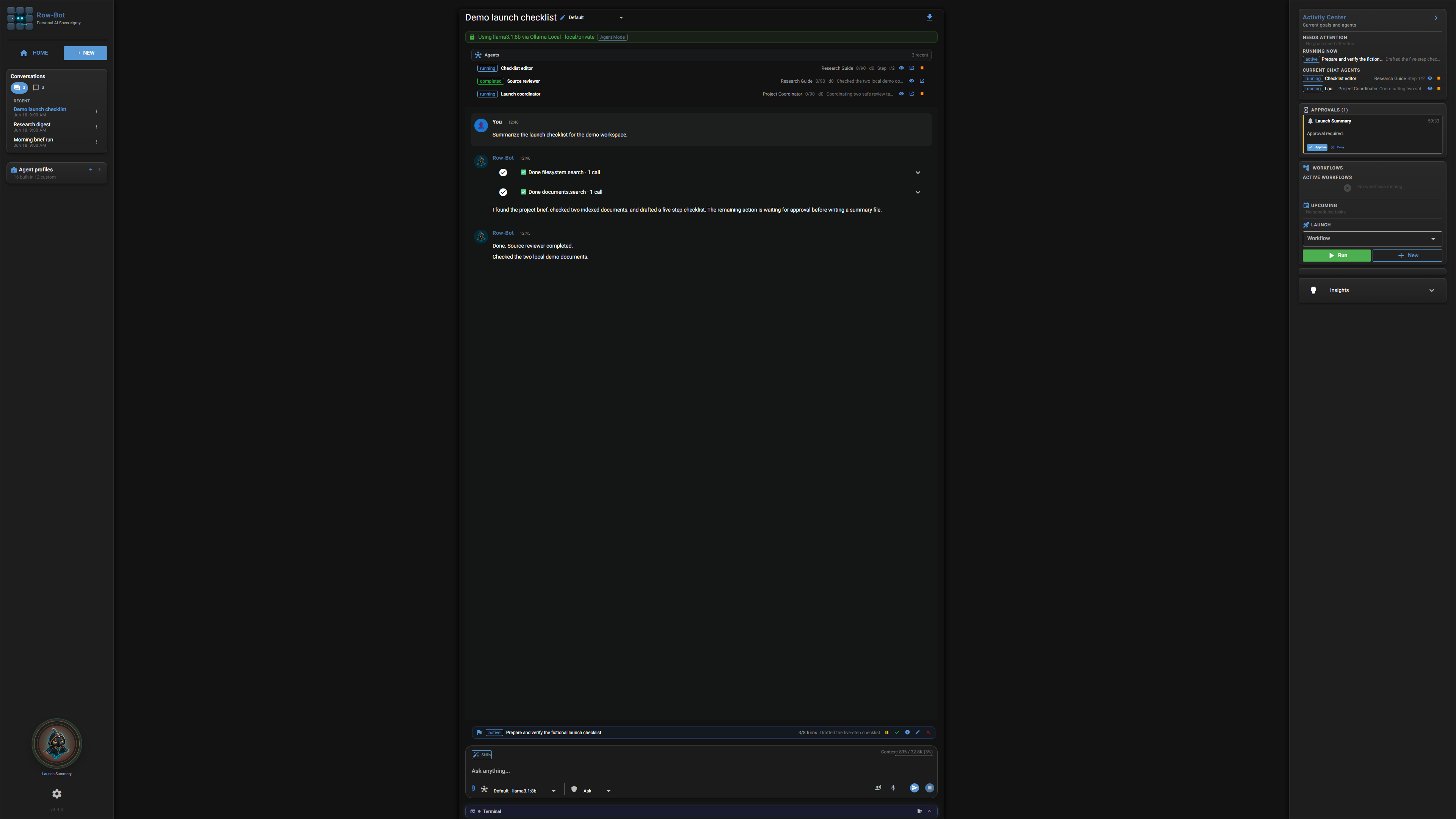
A small card beside each conversation shows what it is working on — designs, code folders, the browser — along with its goal, its outputs, and its agents with Stop and Message. It floats beside a wide chat and opens as a sheet on smaller screens.
Per conversation
Command palette
Press ⌘K or Ctrl+K to search conversations and their messages, commands, settings, and saved workflows at once. Plain intents in any word order, such as “connect telegram”, “turn on developer tools”, or “dark mode”, find the right action, settings switches show their state and change with Undo, and Enter runs only a result that matches what you typed.
Keyboard first
Terminal dock
Open a real terminal on your own shell, docked under the conversation in the desktop app, with colours, history, Tab completion, Stop with Ctrl+C, a height remembered per device, and scrollback that survives closing the dock. Open in your terminal starts your own terminal app at the code folder, and commands the assistant runs still use their approval cards.
DesktopYour shell
Sidebar and settings
The sidebar groups conversations by time and filters them as All, Chats, Designs, Code, or Workflows. Settings sit in six groups with search over pages and single rows, and save as you change them with Undo; appearance follows the operating system in light or dark, and any conversation exports as Markdown or PDF.
Built inLocal
02 / AGENTS
Durable roles, visible goals, coordinated work.
Row-Bot turns a conversation into a controlled working environment. Profiles define how an agent should operate, goals keep long-running intent visible and moving, and one authoritative parent can plan, delegate, join required results, continue through several work waves, and produce the final answer.
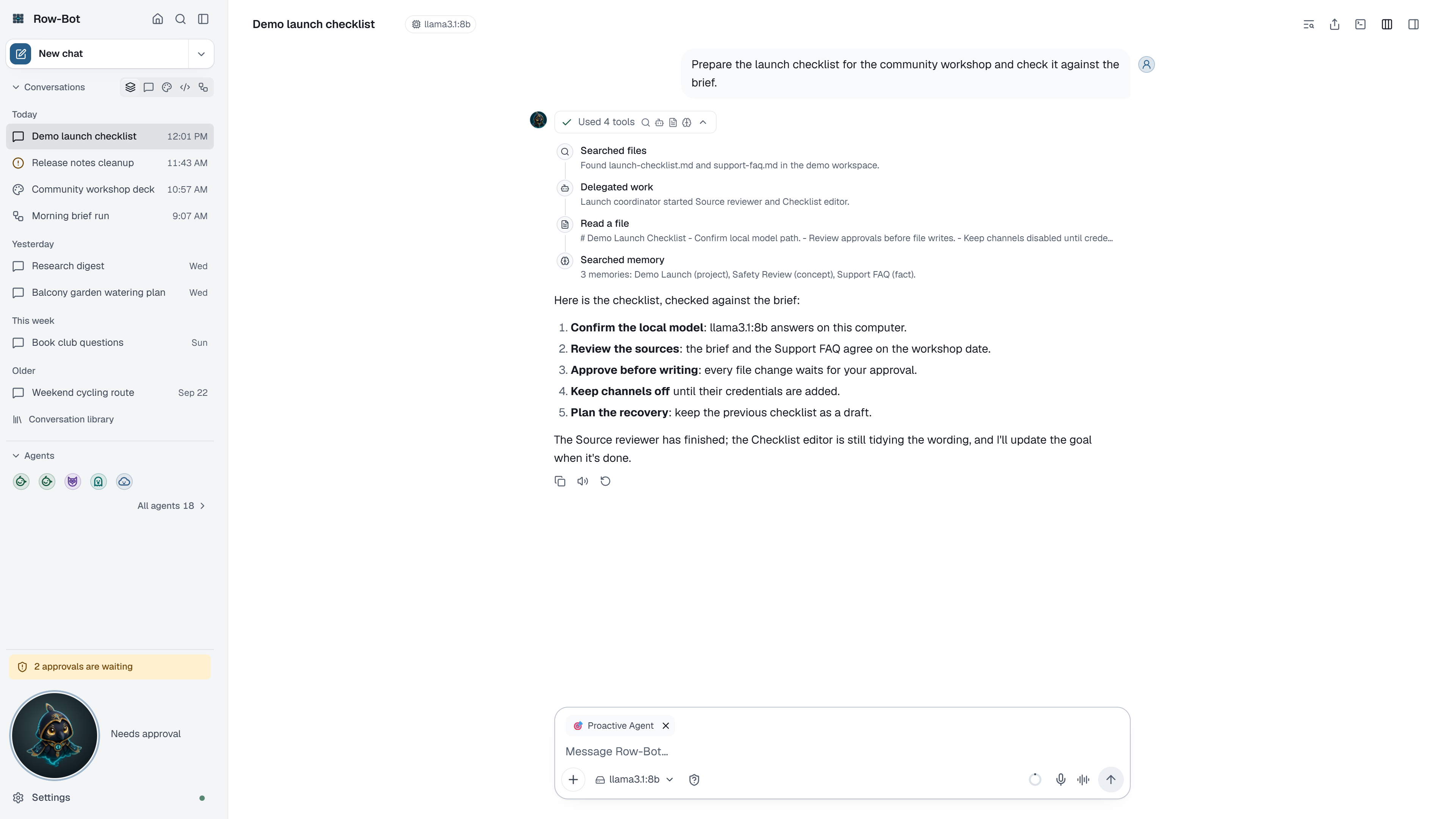
A goal card and the conversation’s live agents in its details card. Demo data.
Agent Profiles
Give a conversation a reusable role with instructions, usage guidance, handoff contracts, workspace policy, enabled tools and skills, approval policy, and model preferences. The sidebar’s Agents dialog holds the profile library and your favourites, and profile snapshots travel with delegated work so the operating contract remains explicit.
Built inDesktop + phone
Goals that keep working
Set a goal from the conversation details card or with /goal and Row-Bot starts at once, continuing after each turn until the work is done, with optional turn and time limits. The goal card shows the turn, time running, tokens, the latest progress reason, Pause or Resume, and Stop; a goal pauses with its reason when progress stalls, waits out provider rate limits, stops for approvals, and delivers terminal notices through configured channels.
Built inDesktop + phone
Automatic parent-led orchestration
Delegate required or background work with dependencies, duplicate-objective checks, multiple work waves, live joins, and visible capacity limits. Stop or message a delegated agent from the conversation details card or its own conversation, and answer its approvals in either place. The parent remains responsible for follow-up and the final response.
Built inApproval aware
Checkpointed execution budgets
Bound long-running Agent work with durable model-and-tool round counters, repeat-stall protection, exactly-once finalization, and configurable nesting, concurrency, and active-time limits. Extra child runs wait in a fair queue instead of bypassing capacity.
Bounded executionDurable
Durable joins and recovery
An ordered inbox returns approvals, completions, retries, steering, and stop events to the parent. Checkpoints, leases, and finalization claims recover interrupted work without duplicate synthesis, delivery, or final answers.
Parent linkedExactly once
Buddy desktop overlay
Keep the selected conversation, including one with a design or code folder, in a compact always-available overlay on Windows and macOS. Buddy shares the conversation’s draft, model, tools, approvals, and run state instead of creating a second conversation.
DesktopShared context
03 / MODELS
Local, self-hosted, hosted, or subscription-backed.
Every selection stays provider-qualified from setup through runtime. Row-Bot separates model discovery, credentials, capabilities, readiness, context policy, and transport behavior so similarly named models do not become interchangeable by accident.
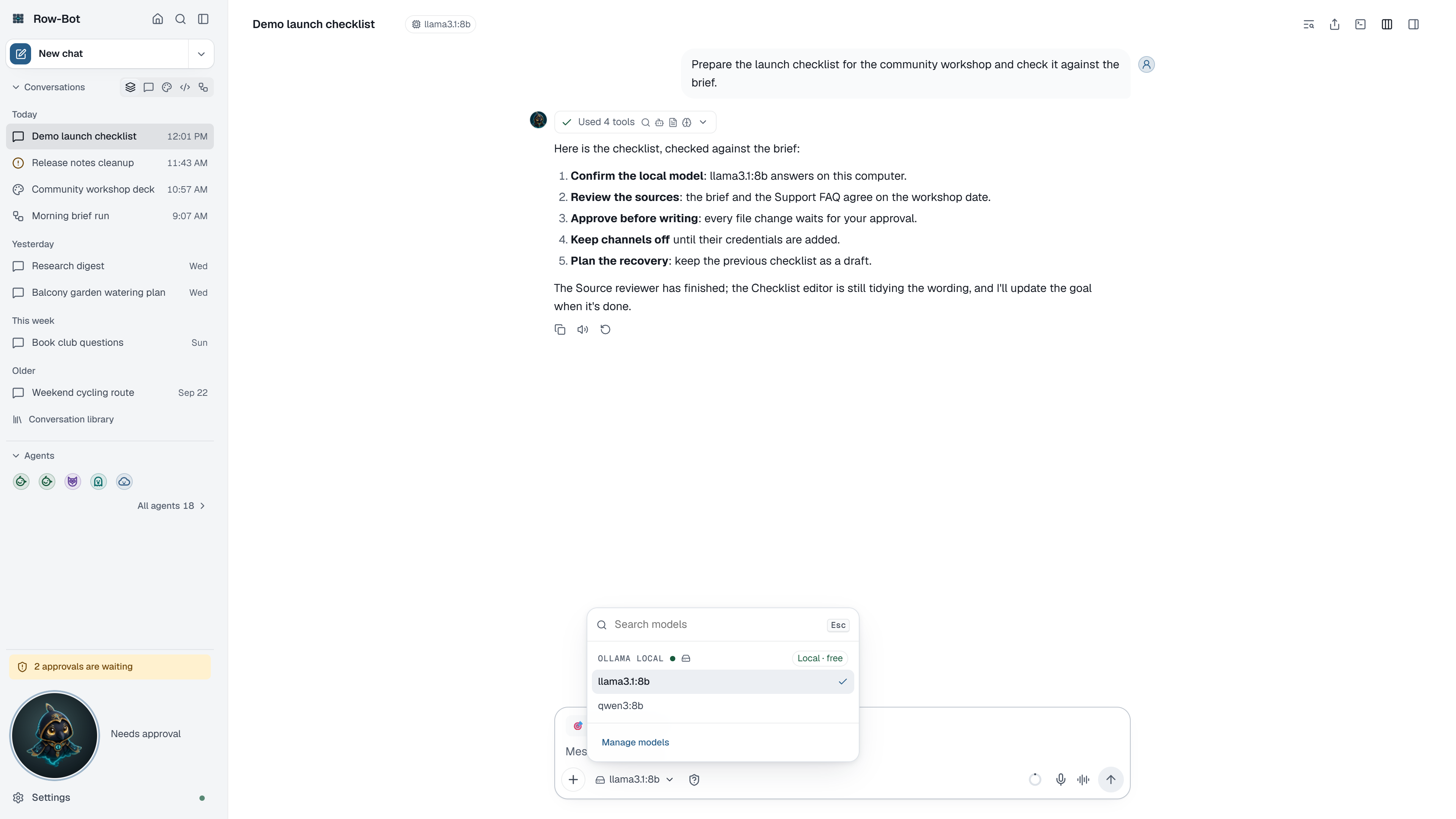
One model list across providers, opened from the composer. Demo data.
Your model, your choice
A fresh install has no preset chat, vision, image, or video model. The first run asks one question, how Row-Bot should think: on this computer, with your subscription, with an API key, or through a custom endpoint. Your pick becomes the default, and if it later becomes unavailable Row-Bot offers Reconnect or Choose another model instead of silently switching.
No presetsExplicit
One model list
The composer and the Brain, Vision, Image, and Video pickers share one grouped, searchable list with billing tags, and the model pill says Unavailable with the reason when a model cannot run. Vision follows the chat model unless you choose another, and attaching an image to a model that cannot see it offers a vision model.
Built in
Local and self-hosted models
Discover and use Ollama plus OpenAI-compatible runtimes such as LM Studio, vLLM, llama.cpp, LocalAI, LiteLLM, SGLang, and oMLX. Local endpoints remain distinct from hosted services and can work offline when their runtime and model are local.
LocalOffline capable
Hosted API providers
Connect OpenAI, Anthropic, Google AI, xAI, OpenRouter, Requesty, Atlas Cloud, MiniMax, OpenCode providers, Ollama Cloud, and custom endpoints. Capability mapping routes chat, tools, reasoning, vision, image, and video models to compatible surfaces.
OptionalHosted
Subscription sign-in
Keep xAI Grok OAuth, ChatGPT/Codex, and Claude Subscription authentication separate from API-key providers. OAuth health, credential source, model visibility, and runtime readiness appear in provider settings.
OAuthOptional
Automatic catalog discovery
Targeted, startup, and scheduled refreshes discover newly available models through provider-scoped saved credentials. Last-known-good provider rows survive failed or incomplete refreshes, while live, cached, fallback, and empty outcomes remain visible.
Resilient discovery
Context and prompt cache
The composer’s context meter estimates the complete next model input, including system prompts, images, and bound tool schemas. Model-aware rolling compaction starts with safe headroom, preserves recent complete turns, and records durable status, while prompt-cache diagnostics and provider-specific reporting keep long conversations predictable.
Built in
Provider-safe tool schemas
Inspect the effective schema sent through each adapter. Gemini-compatible filtering catches untyped arrays before a request is made, while unaffected providers keep the original tool contract and explicitly requested incompatible tools fail clearly.
Provider aware
04 / TOOLS
Use the computer, not just the model.
Row-Bot can chain built-in tools inside an agent turn, progressively discover enabled external capabilities, limit them through profiles, pause for approval right in the conversation, and return generated files to the conversation or configured delivery channel.
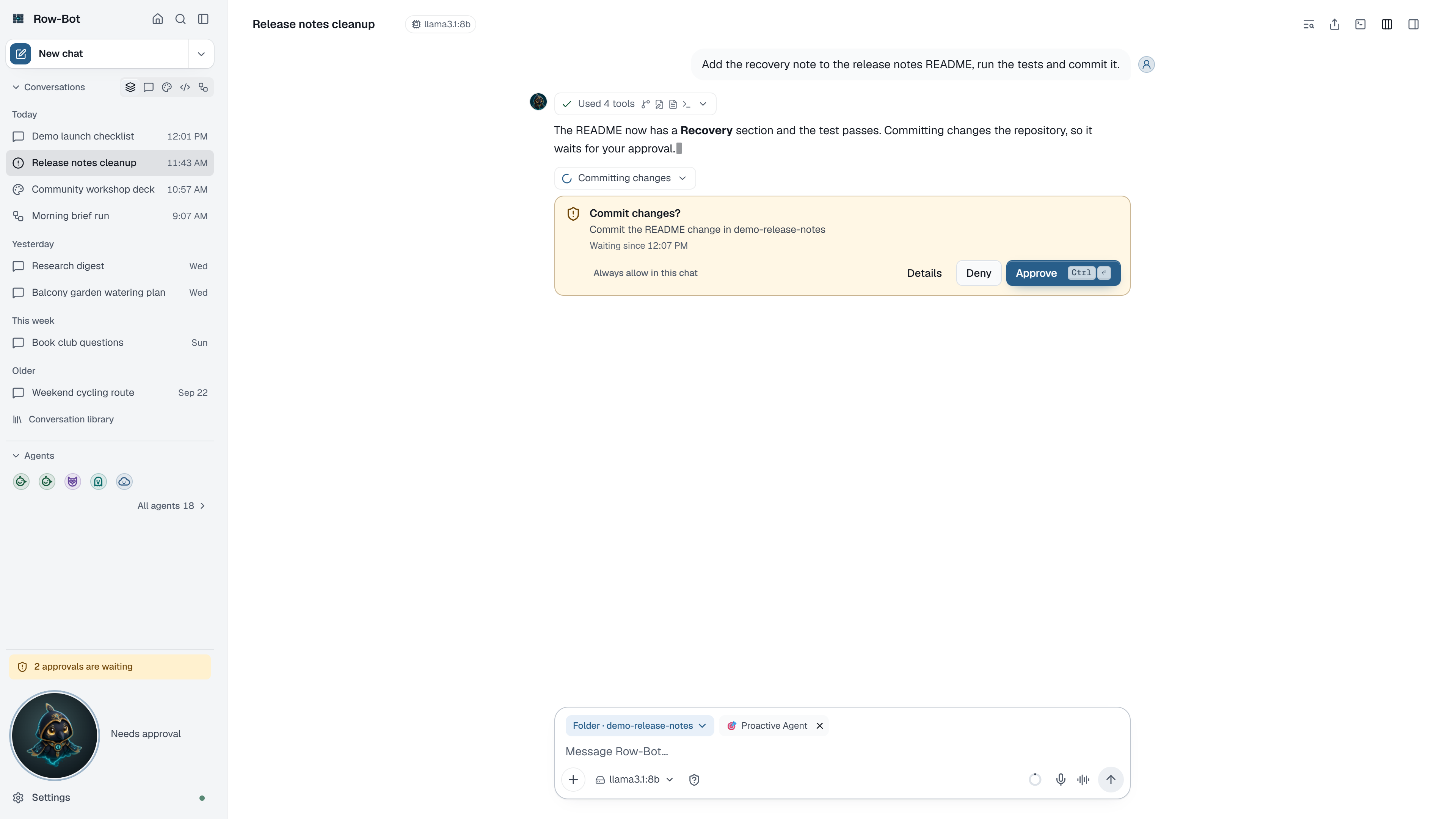
Approve or Deny in place, and every tool step shown with what it did. Demo data.
Search and research
Search the web through configured services or DuckDuckGo, read URLs, query Wikipedia and arXiv, inspect YouTube content, work with local documents, and preserve useful findings in memory or the wiki vault.
Built inSome online
Progressive external tools
Keep core tools ready while deterministic local search finds enabled MCP, plugin, Custom Tool, and channel capabilities only when a request needs them. Auto mode binds the exact selected schema instead of unrelated catalogs; eager compatibility mode remains available without changing provider checks, profiles, approvals, budgets, or workspace policy.
Auto by defaultPolicy preserving
Files, shell, and managed browser
Read and manage files, run approval-gated shell commands with operators explained rather than refused, and automate managed Chromium sessions under Row-Bot’s browser policy. Snapshot-bound observations, sensitive-output redaction, visible consequential navigation, takeover controls, and action receipts keep browser work reviewable.
Built inApproval gated
Native Computer Use
Opt into the Computer Use beta for Windows and macOS through the pinned, checksum-verified Cua Driver 0.20.0. A Using your computer card shows the app and the latest picture, kept in memory only, with Pause to take over, Resume, and Stop, while target-window capture, semantic actions before coordinate fallback, action receipts, an exclusive interactive lease, point-of-risk approvals, blocked sensitive surfaces, and ephemeral Vision fallback constrain every session. The separately installed driver’s consent-gated third-party telemetry is disclosed before enablement and is not a Row-Bot telemetry pipeline.
BetaExplicit install
Email and Calendar
Use Gmail and Google Calendar with OAuth-backed tools for search, drafting, event lookup, typed mutations, and bulk creation. Calendar operations use request-scoped clients, safe concurrent refresh, retries, ordered writes, and timeout reconciliation.
OAuth
Analysis and output
Calculate, query Wolfram Alpha, inspect weather, analyse images, search conversations, create charts, generate or edit images, and produce video through compatible provider models. Media choices remain scoped to the correct surface, with xAI image options discovered from live model capability metadata.
Built in + providers
05 / KNOWLEDGE
Memory that remains inspectable.
Useful recall needs more than an opaque summary. Row-Bot stores structured local records, combines semantic, lexical, and graph signals, and keeps review state and trace information available when you need to understand why something returned.
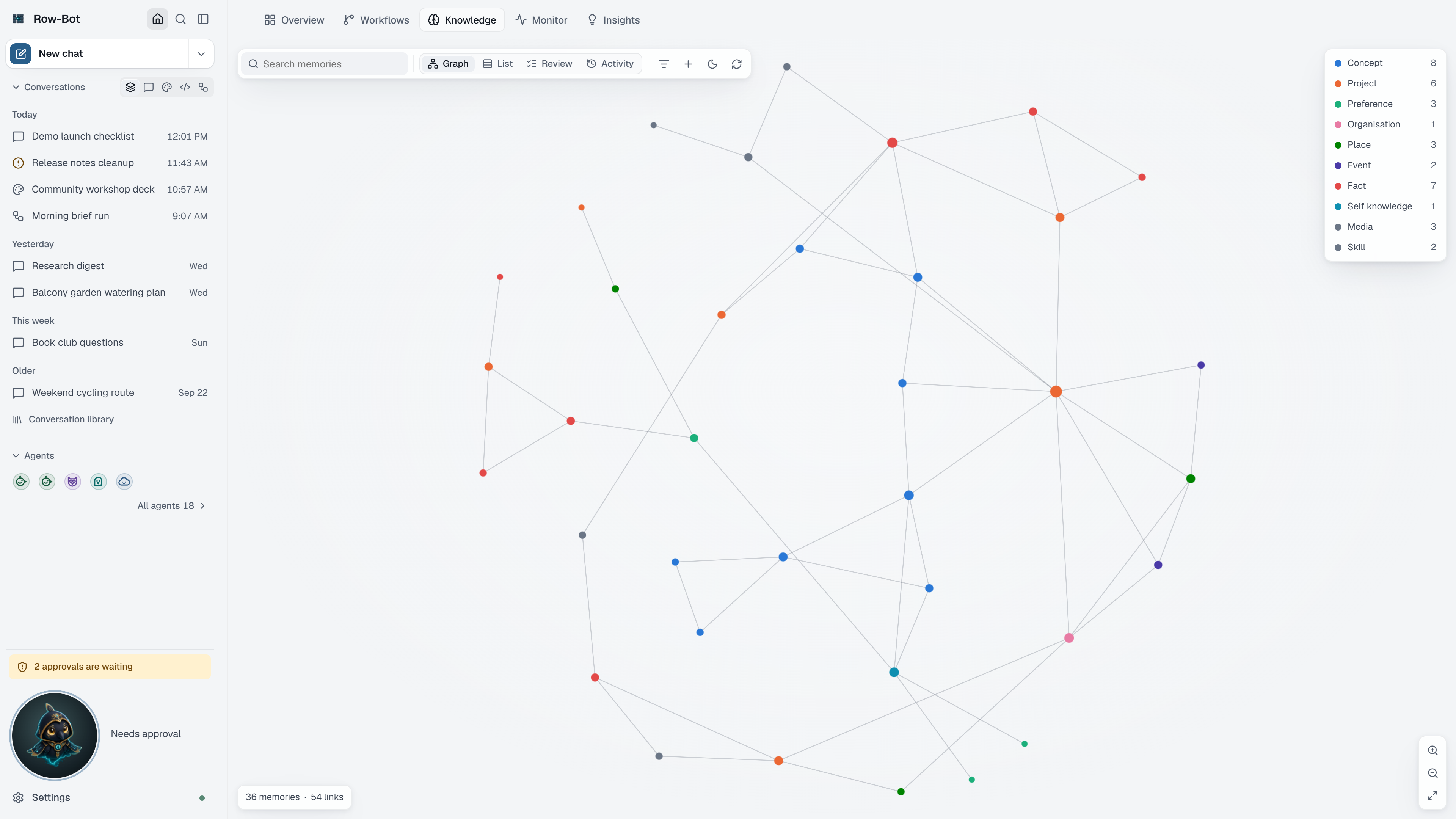
Home › Knowledge: the memory graph, filtered and searchable. Demo data.
Personal knowledge graph
Represent people, projects, preferences, facts, events, documents, and other entities as typed nodes and relationships. Explore them on Home’s Knowledge tab, where a WebGL graph shows up to 2,000 memories (5,000 with Show all), focuses a memory’s neighbourhood, and filters by type, beside the review queue, bulk actions, Add memory, and activity logs. Vague relation types are refused before saving, and inconsistent records can be repaired.
LocalAuditable
Bounded hybrid recall
Combine configurable embeddings, FAISS semantic search, FTS5 lexical matching, and bounded graph expansion. Local embedding startup is cache-only, downloads and repair are explicit, and missing models fall back quickly to lexical and graph retrieval instead of stalling the request.
Bounded recallLocal by default
Durable document ingestion
Stream bounded uploads into a persistent SQLite queue, deduplicate content, make the complete batch searchable before extraction, and publish sharded vector manifests atomically. Pause, resume, cancel, retry, repair, and restart without losing safe progress.
Built inResumable
Resumable extraction
Extract knowledge from PDFs, spreadsheets, JSON, TSV, images, and common text formats through bounded map-and-reduce checkpoints. Source metadata stays attached and final document, graph, and Wiki Vault updates commit idempotently.
TraceableIdempotent
Wiki Vault and Dream Cycle
Export an Obsidian-compatible local wiki with readable article names, synchronise selected knowledge, and let the idle-aware Dream Cycle consolidate memory or prepare bounded improvement proposals while preserving busy-state and review controls.
OptionalLocal
06 / WORKFLOWS
Background work with visible control.
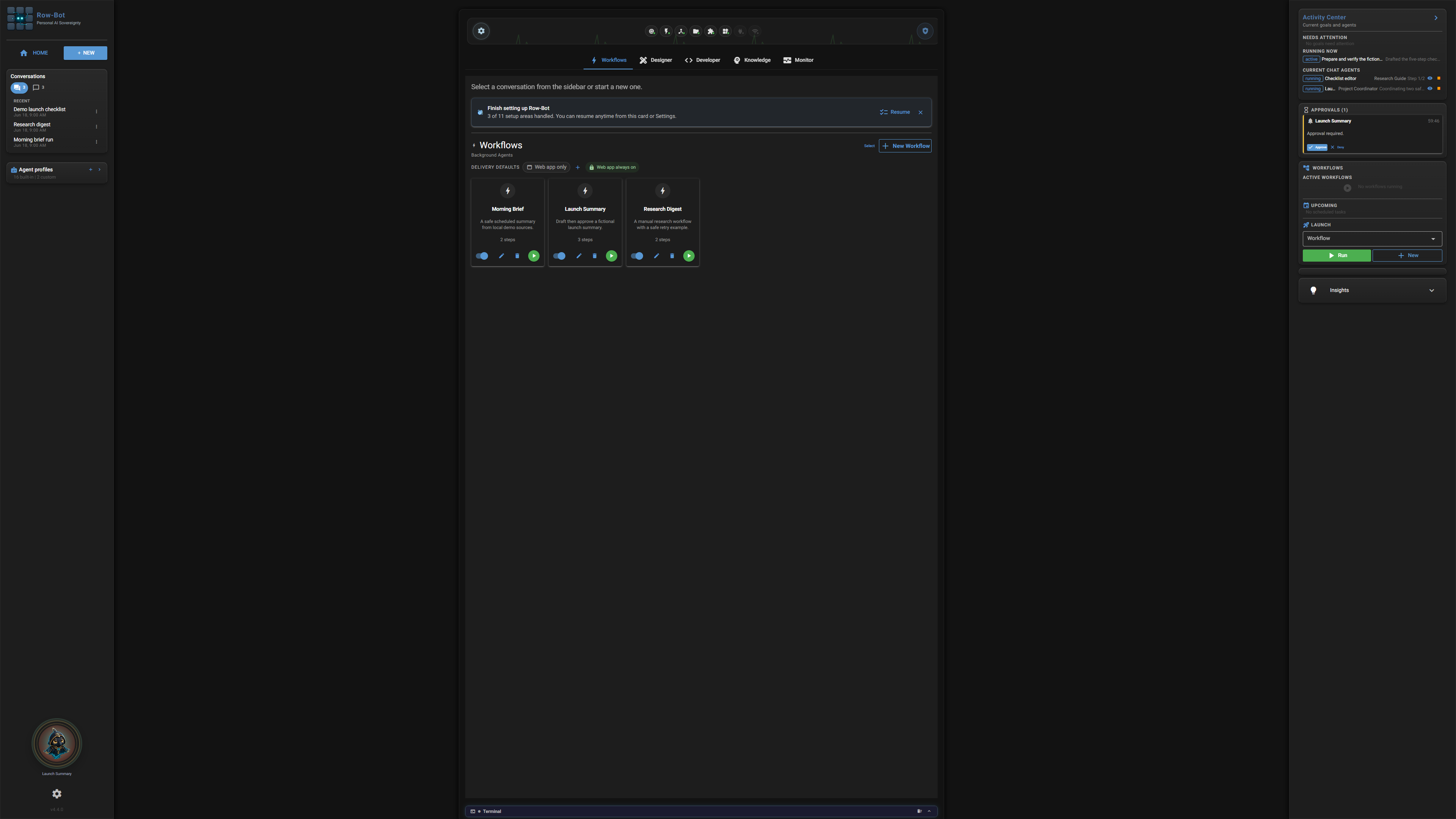
Turn repeated tasks into scheduled or manually triggered pipelines without turning them into invisible automation. Profiles, delivery choices, conditions, approvals, run history, and recovery state stay attached to the workflow.
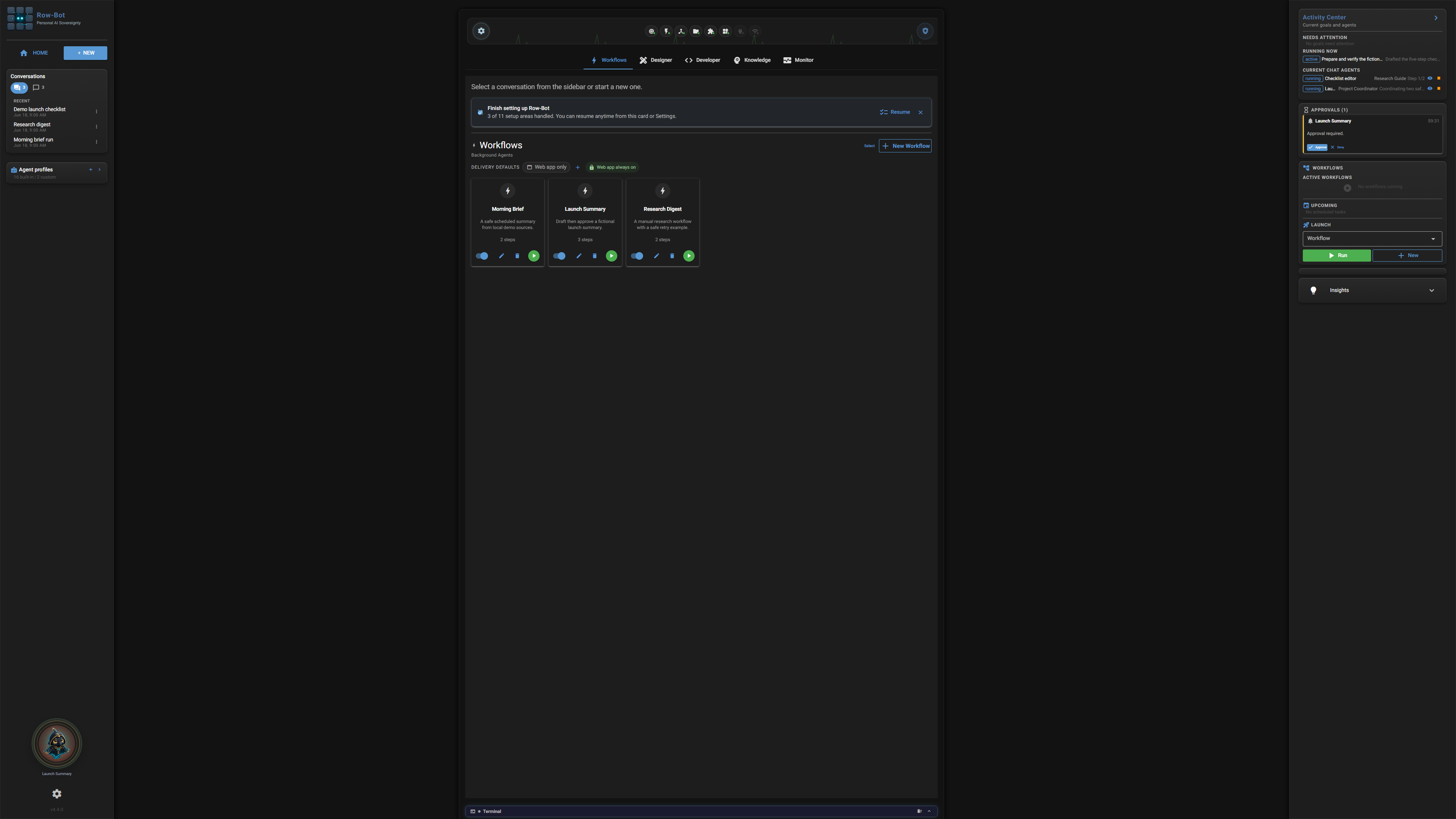
Home › Workflows: schedules in words, next runs, and recent results. Demo data.
Profile-first workflows
Choose a profile, model, tool policy, prompt, schedule, persistent conversation, conditions, approval mode, and where results go. The builder keeps steps in an ordered list with the schedule written in words, suggests variables and step outputs as you type {{, and keeps the graph editor one toggle away; webhook triggers show their address with Copy and accept their secret as a header.
Built inDesktop + phone
Approvals and delivery
Pause consequential actions for approval in the app or supported channels. Results always arrive in the app, plus any configured channels you tick; workflow-level delivery defaults distinguish no destinations from inherited destinations, and channel retries retain terminal notices until they can be reconciled.
Approval aware
Run history and diagnostics
Follow a run live in its drawer, run a failed workflow again from Overview, and inspect scheduled runs, subtasks, pipeline state, errors, completion summaries, and recovery diagnostics on Home rather than relying on ephemeral notifications.
Durable history
Shared cancellation scope
Stop connects the active generation to provider responses, subprocesses, tool waits, browser work, MCP calls, voice turns, and child agents spawned by that generation. Unrelated runs remain untouched.
Scoped cancellation
07 / ACCESS
One owner. Every device.
The desktop app, a browser on another computer, and a phone open the same app against the same Row-Bot host. The host remains the system of record, a small screen changes layout rather than authority, and every signed-in device can be reviewed and signed out.
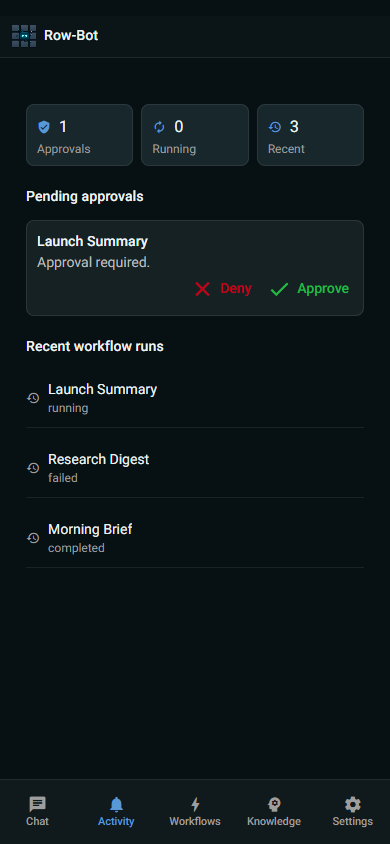
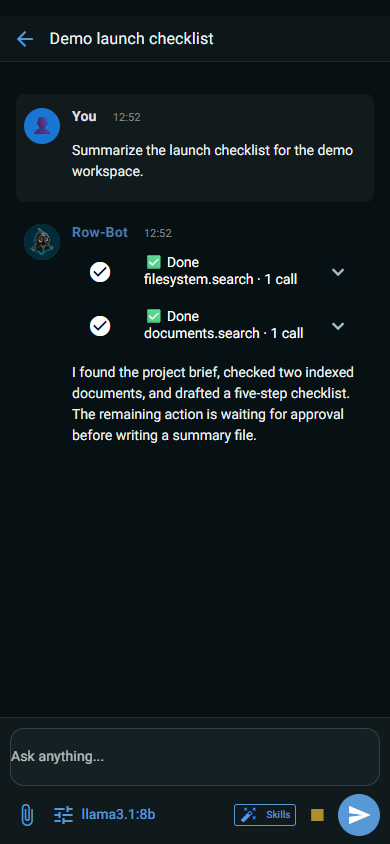
On a phone: what needs you, and a conversation. Demo data.
Guided connection
Connect a phone or computer from Settings › Devices & remote access. Row-Bot detects the ways in — Tailscale for private HTTPS, the same Wi-Fi, or the internet through your public link — then shows one QR code backed by a one-time invitation that renews itself, waits for the device, and shows how to install Row-Bot on that phone.
Optional remote accessGuided
Phone and tablet layout
Small screens get one header, the sidebar as a drawer with the same filters, panels as full-height sheets, and every Settings page. Create conversations, attach files, choose profiles and models, approve work, and stop active runs away from the desk.
Desktop + phone
Your devices
See each signed-in device by name, which one you are using, and where and when it was last seen in plain words. Rename a device or sign it out, which ends every session of that device; invited devices renew their session in the app and never revive a revoked one.
Revocable
Invitations and sessions
Create origin-bound, expiring, one-time invitations from the app or CLI. Instance-isolated HttpOnly sessions renew authoritatively, record secret-free audit events, and support logout plus immediate session or device revocation.
AuthenticatedRevocable
Authenticated server mode
Run row-bot serve for a long-lived headless host. HTTP requests and the live event stream share exact-origin, allowed-host, trusted-proxy, and authenticated-owner gates; server loopback does not bypass authentication.
HeadlessSame owner
Trusted and managed routes
Save exact owner-controlled HTTP or HTTPS browser addresses so admission, invitations, and later removal take effect without a restart. Environment-managed origins remain read-only, assigned non-private interfaces carry explicit exposure warnings, and Row-Bot cleans up only the Tailscale routes and tunnels it owns.
Advanced
08 / CHANNELS
Live conversations beyond the desktop.
Messaging adapters share one delivery engine while preserving the limits and native interaction model of each platform. Channel work uses the same conversations, profiles, goals, approvals, media handling, and final records as desktop turns.
Set up Telegram, Slack, Discord, SMS, WhatsApp, Google, X, GitHub, and plugin sign-ins through numbered steps in one sheet, with an explicit test message to yourself and a live WhatsApp QR code. A channel that needs a public address opens it only when you configure that channel and shows where it is reachable.
GuidedExplicit
Streaming delivery
Coalesce edits, keep typing alive, bound previews, split long output safely, respect rate limits, clean up previews, and send a fresh final message when an edit cannot complete. Discord, Slack, Telegram, and WhatsApp use the best supported path.
Streaming
Interactive approvals
Approve or deny through Discord buttons, Slack Block Kit actions, Telegram inline controls, WhatsApp resume flows, or explicit SMS YES/NO handling. SMS intentionally remains final-text-only with safe chunking.
Native controls
Voice and speech
Use local Whisper speech-to-text and Kokoro text-to-speech for dictation and read aloud, or opt into compatible realtime voice providers to talk. Authenticated browsers can capture, transcribe, and play speech locally to that session without starting the host microphone service or retaining browser media.
Local optionsOptional providers
Media and terminal notices
Receive images and documents, return generated files, show reactions and health state, and deliver compact once-only goal or child-agent completion notices. Failed terminal notices remain available for retry.
Native + plugin channels
09 / DESIGN AND CODE
Designs and code folders, beside the conversation.
Design and code work happens in the conversation that asks for it. A design or code folder belongs to that conversation and opens in its Design or Developer panel beside the chat, so you can ask for a change, watch it land, review it, and keep going. Generated designs stay editable; repository changes stay reviewable.
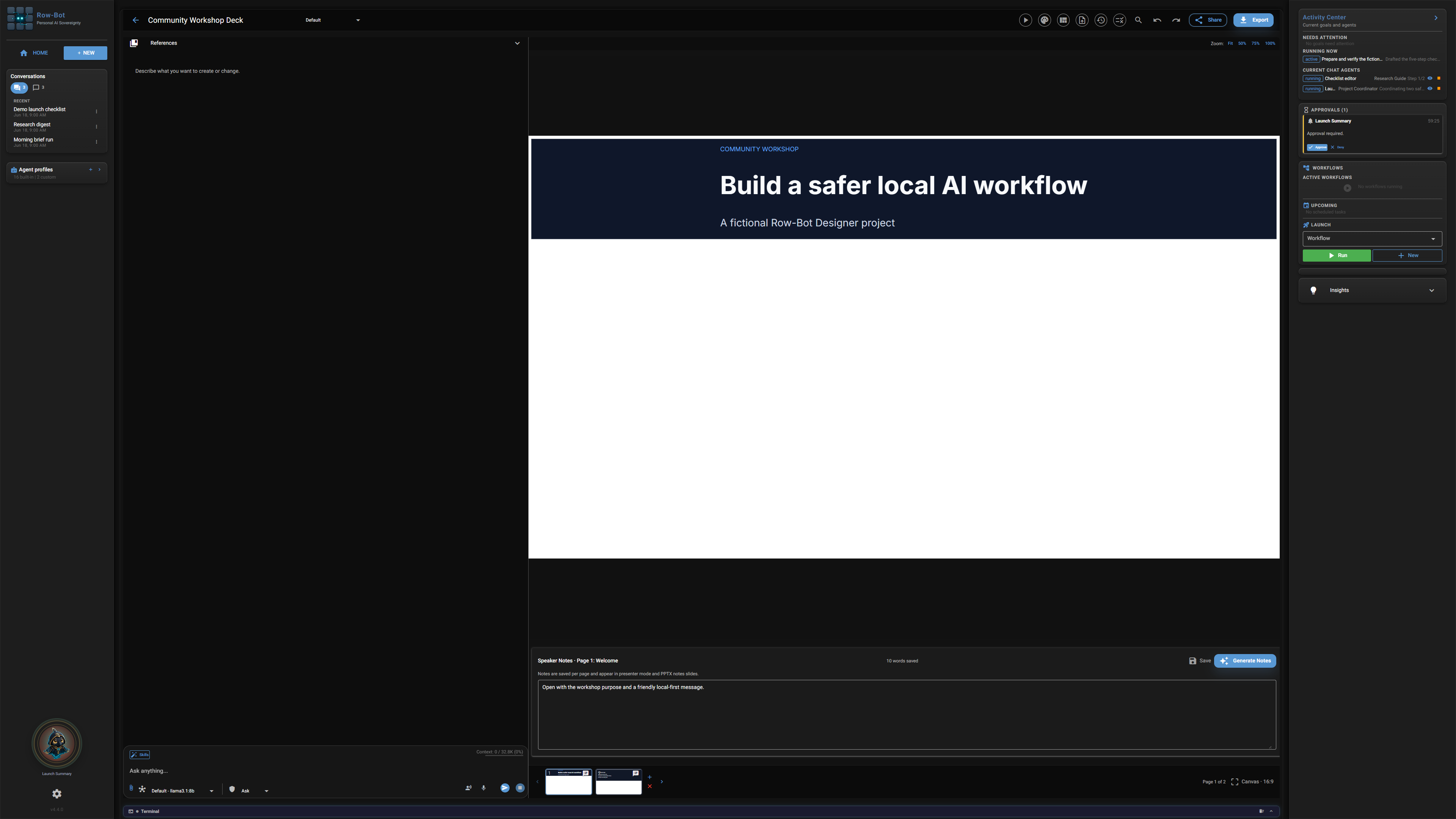
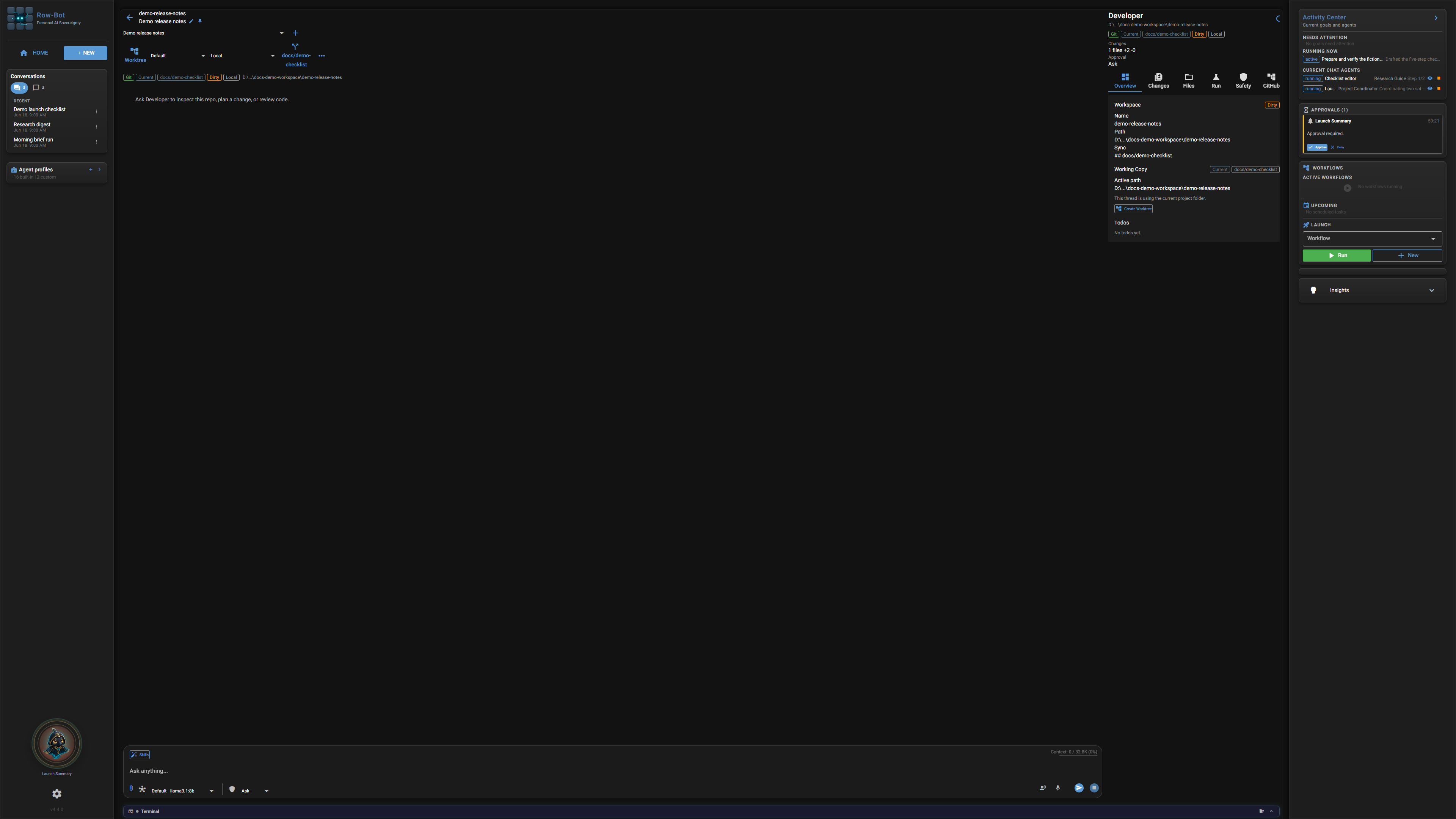
The Design panel and the Developer panel, each beside its conversation. Demo data.
Five kinds of design
Make decks, documents, landing pages, app mockups, and storyboards from a request, Add resource, or Home’s New design. The Size menu offers 16:9, 4:3, square, A4, and phone and re-fits every page, anything unusual is one request away, and brand colours and fonts can come from a website.
DesktopFive kinds
The Design panel
Switch between Preview and Edit, select any element to ask Row-Bot for a bounded change, or double-click text to edit it in place. Pages, undo and redo, saved versions, and a review that fixes issues one by one or every safe one at once keep iteration reviewable.
Editable
Present, share, and export
Present full screen, publish a link with Copy and a locally drawn QR code, send to a channel, or prepare an X post. Export to PDF, PNG, PowerPoint, or HTML in one click into the workspace’s Exports folder, while the sandboxed runtime constrains generated scripts and critique and repair loops check the work before handoff.
Local projects
Media and data
Generate or edit images, add provider-compatible video, insert charts, attach references, and keep assets with the design before the first draft or a later revision.
Provider optional
Code folders from a conversation
Ask Row-Bot to use a folder you already work in or to clone a repository, and it binds the folder once you choose where; Add resource can also start a draft, register an existing folder, or clone. Worktrees keep a conversation or delegated run separate from unrelated work.
DesktopGit
The Developer panel
Review diffs and the agent’s change sets in Changes, browse Files, run detected checks and reviewed commands in Run, and branch, commit with a suggested message, push, and open pull requests in Git. Install, network, delete, commit, push, and PR actions require approval.
Approval gated
Docker Sandbox mode
Run commands and edits in a shadow copy, inspect the result, and import approved changes back into the real repository. Import gates protect the workspace from unexpected sandbox output, and sandbox network access stays off, asks, or on by your choice.
OptionalSandbox
Agent-linked development
Profiles, goals, child agents, tool policy, write locks, cancellation, and approval reasons work the same in a conversation with a code folder, so long-running implementation follows the same operational model as other Row-Bot work.
Integrated
10 / EXTENSIONS
Extend the workbench without hiding the boundary.
Skills, plugins, MCP servers, and Custom Tools add capability through separate contracts. Enablement, permissions, configuration, health, and profile policy determine what becomes available to an agent.
Discover public skills, install, enable, and pin reusable instruction packages, invoke slash commands, and let Row-Bot select up to five relevant enabled skills per parent task or child Agent. Reopened tasks restore their skill state, while skills remain instructions and cannot grant tools or bypass profile, approval, budget, or workspace boundaries.
Built inTask scoped
Plugin System v2
Install reviewable plugins that provide native tools, packaged MCP servers, bundled skills, or channels. Manifests declare permissions, settings, secrets, authentication, health checks, versions, and supported extension surfaces, and their disclosures appear before installation.
Plugin Center
MCP client and marketplace
Connect stdio, HTTP, or SSE servers with capability metadata, safety classification, requirements, probes, conflict handling, and approval gates. Add and connect tests a server, lets you accept its tools, and enables it in one pass, while marketplace metadata, including catalog entries such as Xquik, remains intact through configuration edits.
OptionalReviewable
Custom Tool builder
Turn a repository, local folder, or current code folder into a reusable tool through Source, Inspect, Test, and Enable stages, then manage it in Settings › Tools › Custom tools. Its commands use the standard approval card, and safer Git setup, isolated environments, command checks, and removal keep experiments bounded.
Approval gated
11 / PRIVACY
Control is a system property.
Local-first means durable application state belongs to the user, external routes are explicit, and consequential actions remain reviewable. It does not pretend that a hosted model or online tool can be used without sending that service the data required for the request.
Store conversations, profiles, goals, orchestration records, workflows, document queues and indexes, memory, designs, plugin state, code context, and owner access records under the Row-Bot data directory.
Local
Credential protection
Use the operating-system credential store on desktop or an isolated encryption key with encrypted provider and channel records in server deployments. Read-only secret directories, safe fingerprints, and redacted status keep plaintext credentials out of application metadata and diagnostics.
Encrypted at rest
Approval and risk policy
Classify destructive, networked, private-data, metered, installation, Git, shell, browser, channel, and MCP actions conservatively. Approve or Deny in place — in the conversation, the attention indicator’s list, Home’s Overview, a floating notice, Buddy, or a supported channel — with bounded reasons. Approvals wait until answered and survive restarts, while the original action payload is retained for the decision.
Reviewable
No hidden Row-Bot cloud
Row-Bot has no required account or hosted sync service. Its only first-party telemetry is install stats: once a day, a random ID, the version and the system, on by default, documented on the privacy page, and off in one click. Optional providers, channels, tunnels, updates, search, and external tools remain individually visible choices. The opt-in Cua Driver has separately disclosed, consent-gated third-party telemetry; it is the reviewed exception, not Row-Bot telemetry.
Install stats onlyExplicit services
Backup and restore
Back up now writes one zip to the workspace’s Backups folder without keys, sign-ins, sessions, caches, logs, or runtimes, and lists what to set up again. Restore from backup checks the archive, applies it at the next start, keeps the current profile aside, and rolls back if anything fails.
LocalNo secrets
Conversation cleanup
Select conversations in the library with filter-aware bulk controls and remove them through one cleanup path. Active work is cancelled before deletion, while dirty Developer recovery state, code folders, and design ownership are preserved.
Explicit actionRecovery aware
12 / PLATFORMS
Installable, diagnosable, and repairable.
Windows and macOS are first-class desktop targets, Linux provides the browser/server application through a verified XDG user install, and the official multi-architecture container provides a hardened headless path for private servers and VPS hosts.
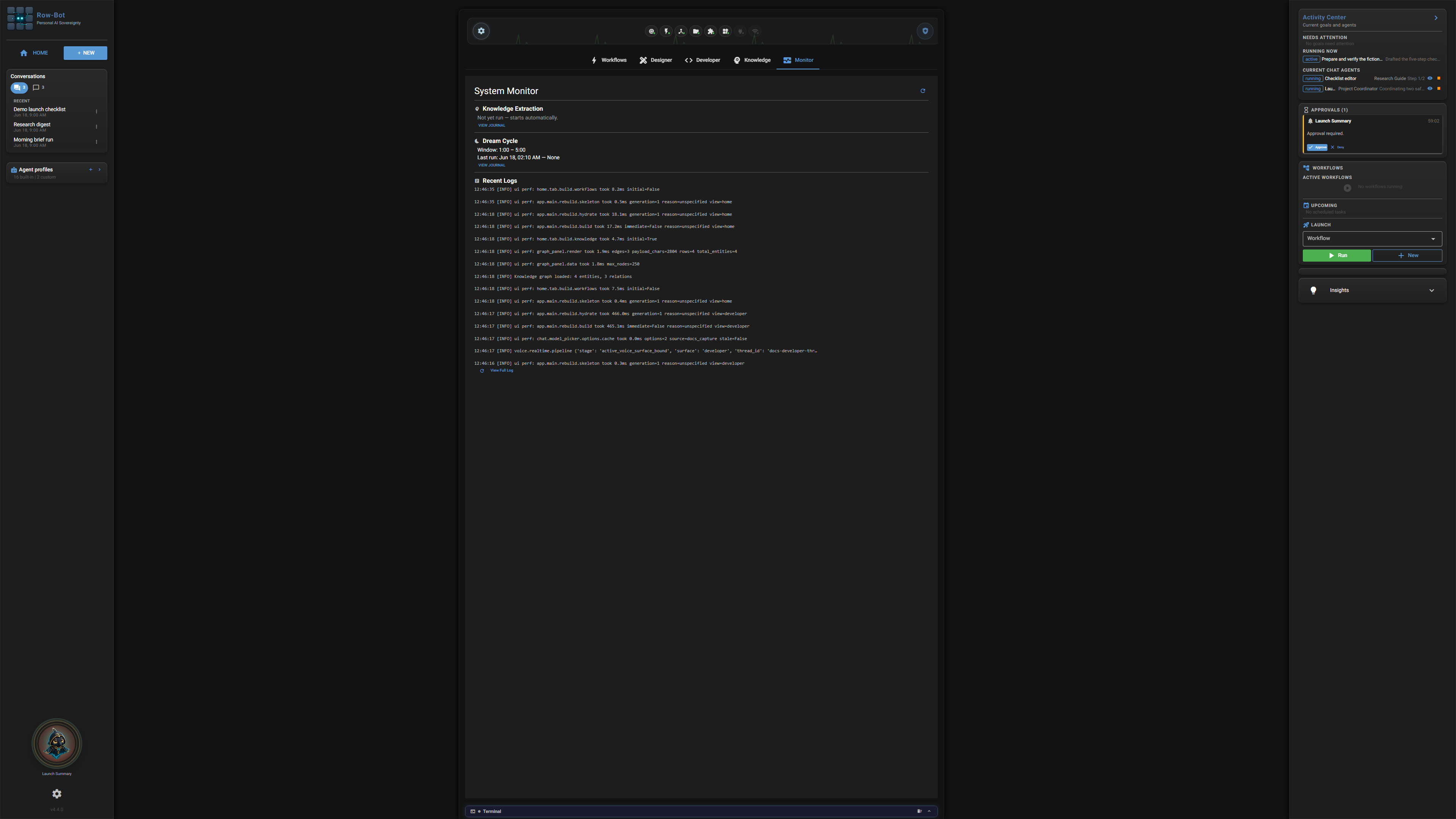
Home › Monitor: health at a glance, with the fix beside each problem. Demo data.
Platform installers
Use the Windows x64 installer, macOS Apple-silicon DMG, or verified Linux one-line installer and tarball. Published artifacts, checksums, and platform trust details are listed with each release so signing or notarization is never implied.
WindowsmacOSLinux
Official Docker server
Run the locked non-root amd64 or arm64 image with a read-only root filesystem, dropped capabilities, bounded logs, a persistent data volume, and a separate persistent secrets volume. Compose, VPS, Caddy, systemd, backup, upgrade, and rollback examples keep operations explicit.
DockerVPS
First run and Setup Center
The first run asks one question — how should Row-Bot think? — and opens Home once you choose a model. Setup Center then resumes everything else across providers, credentials, tools, optional integrations, and runtime checks, distinguishing missing configuration, missing dependencies, unhealthy credentials, and unsupported models.
Resumable
Monitor and Insights
Home’s Monitor shows health tiles for the model runtime, channels, MCP and tools, the scheduler, knowledge, and the system, with each problem’s fix in place: restart a channel, renew a sign-in, choose a default model, or open the exact setting. Insights suggest one action each, and the attention indicator appears only when something needs you.
Built inFix in place
Updates and repair
Check signed release metadata, download compatible updates, validate installer contents, and preserve local data through upgrades. Deeper installer verification covers clean installs, repair, upgrade, uninstall, and installed-package smoke checks.
Release verified
Get Row-Bot
Choose the parts you need. Keep control of the whole.
Start locally, add providers and integrations deliberately, and let the workbench grow with the work.