Code Folders
A code folder is a folder or Git repository on this computer that a conversation works on. Bind one to a conversation and Row-Bot can read its files, propose and make edits, run checks and commands you approve, and help with Git. The folder opens in the conversation's Developer panel, beside the chat.
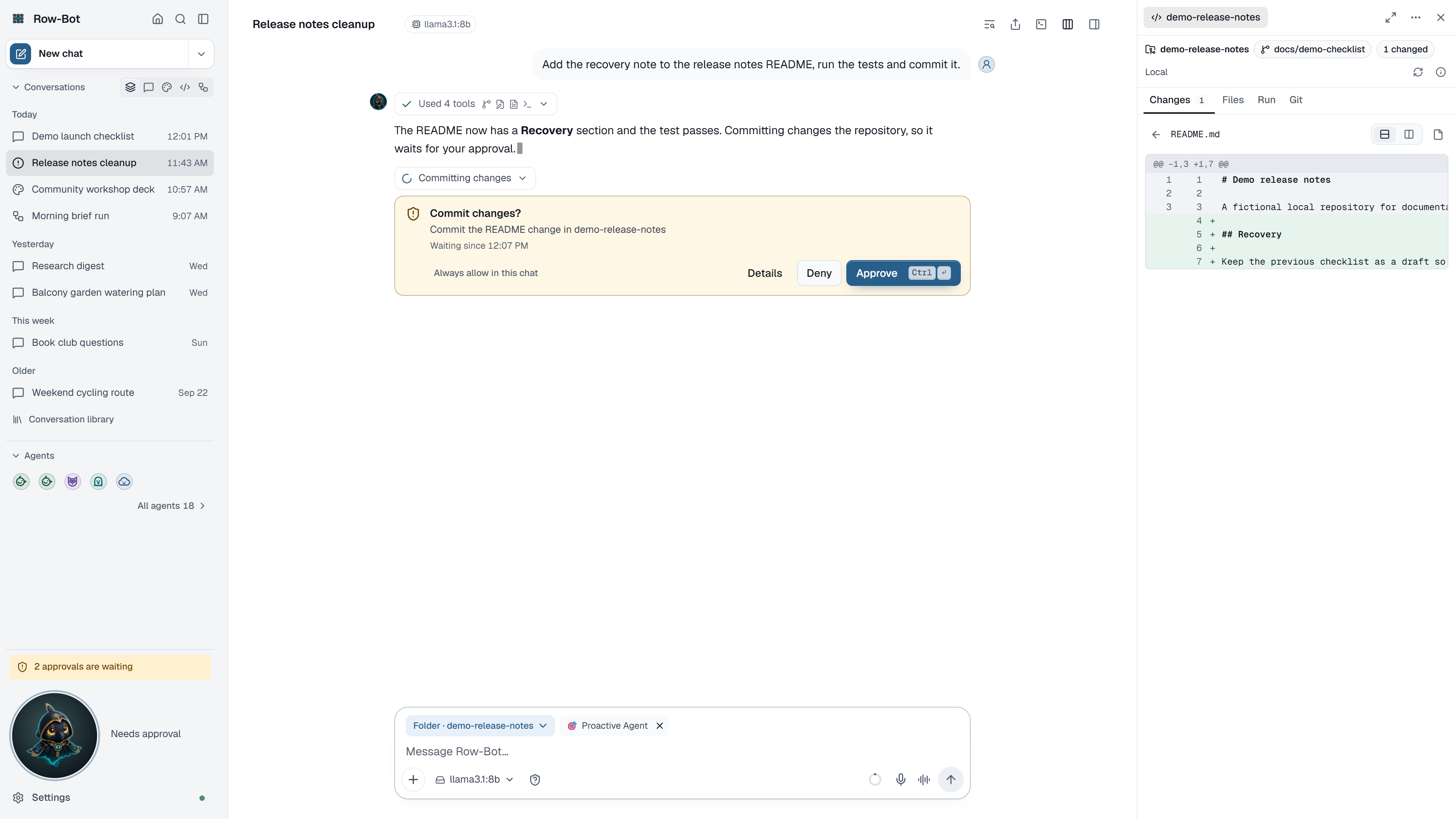
Bring A Folder Into A Conversation
Ask in the chat. Row-Bot binds folders by itself when you ask:
- "Use my Hello-World folder" binds a code folder you already use, by its name. If several names match, a Which code folder? card lets you choose; if none does, a Use an existing folder card asks you to choose the folder on this computer.
- "Clone https://github.com/octocat/Hello-World" shows a Clone a repository card with the address. Choose Choose where to pick the parent folder, and Row-Bot clones it there. An interrupted clone is kept for inspection and offers Check clone status; it is never cloned again automatically.
Either way, the conversation shows a Using code folder … card with Open and Undo. The turn pauses while a card waits for you and continues in the folder once it is bound. Row-Bot never chooses a path on its own: you choose every folder, in the picker or in Row-Bot's workspace folder (below).
Or set it up yourself. Open the composer's + menu, choose Add resource…, then Code folder:
| Folder setup | What it does |
|---|---|
| New draft in the configured workspace | Creates an empty folder under Drafts in your workspace folder. |
| Register an existing folder | Saves an existing folder's name and location; its files and Git state are unchanged. |
| Create a new empty folder | Creates one empty folder under a parent you choose. |
| Clone a repository | Downloads a repository into a new folder under a parent you choose. |
Open saved brings a code folder you used before into this conversation. Home › Overview's New code folder does the same in a new chat.
From A Browser, Phone Or Another Computer
The desktop app chooses folders with this computer's own folder picker. A browser, a phone or another computer signed in to Row-Bot has no picker for this computer, so the same steps (Add resource, and the Use an existing folder and Clone a repository cards in the chat) show Row-Bot's workspace folder instead (Settings › System › Workspace folder), one folder at a time: tap a folder to open it, use the path above the list to go back, and choose Use … for the folder shown. Only folders inside the workspace folder are listed, so put a project there (or clone it there) to work on it from another device.
- There is no path to type. Row-Bot checks every folder it lists and every choice on the computer it runs on: anything outside the workspace folder, a link or Windows junction that leads out of it, or a hidden or Git-internal folder is refused.
- Clone from URL clones a repository into the folder shown, with this computer's own Git sign-in.
- Choosing a folder registers it exactly as the picker does: its files and Git history stay as they are.
Cloning Asks First
A clone downloads from the internet, so it follows the conversation's Approvals: under Ask (and in a new conversation) Row-Bot shows where it downloads from and to, and clones when you confirm; Auto and Hands-off clone when you choose it; Block refuses.
The conversation's details card lists the folder under Working on. Its ⋯ menu, or Undo on the card, unbinds it from the conversation; the files stay on disk.
The Agents tool can also assign a child directly to an existing local folder. Row-Bot validates the path and registers it as that child's code folder; a folder assignment and a pre-existing workspace ID are alternative ways to select the workspace, not settings to combine.
The Developer Panel
- Changes lists changed files with their diffs (unified or split), and the agent's own change sets, each marked reviewed or not reviewed, with Undo or Ask Row-Bot to undo in its ⋯ menu. Earlier agent changes open their saved diffs.
- Files browses the folder and previews files.
- Run lists the checks Row-Bot detected (such as tests and linters) with their last result, runs a command you type (such as
npm test) as a reviewed command, shows running processes with their output, and stops them. Sandbox changes waiting to be imported appear here too, each with its file count and when it was saved; commands Row-Bot runs for you show in the chat. - Git switches or creates branches, commits with a suggested message, pushes (which asks first), opens a pull request through the GitHub command-line tool, and creates a separate worktree for this conversation. Suggest pull request text describes the branch from its commits and files. Confirmations and results appear beside the button that asked. Row-Bot can open a pull request from the conversation too, as a draft by default; see What asks in a code folder.
- Safety boundaries shows what is allowed, what asks first and what is blocked here, where commands run, and whether the sandbox has network access.
- Custom tools turns the folder's commands into a reusable tool with the Custom Tool Builder. Your custom tools are also listed in Settings › Tools › Custom tools.
End-To-End Workflow
- Bind or clone the folder in a conversation.
- Check the folder name, branch and changes in the panel.
- Ask a question about the code, or describe the change you want.
- Approve only the commands and edits you understand.
- Run the checks from Run.
- Review Changes before committing, then commit and push from Git.
Parallel Child Workspaces
Writer ownership follows the resolved workspace folder. Children working in distinct folders or worktrees can edit concurrently, while writers aimed at the same folder are serialized to prevent overlapping changes. Changing only a shell working directory does not create an independent write boundary. Use a separate worktree or folder when two children genuinely need parallel write access.
Sandbox Modes
Local mode lets Row-Bot operate in the selected workspace with your configured file and command permissions. Docker Sandbox mode, when available on a host installation, isolates command execution in a container and requires an import step before changes affect the real workspace. It requires a supported host Docker runtime and can differ from your local environment.
Inside the official Row-Bot application container, Developer Docker Sandbox is unavailable and a requested Docker workspace fails closed; Row-Bot never probes a nested daemon or silently runs that workspace locally. Local mode remains an explicit choice and can see only workspace paths deliberately mounted into the application container.
An approved risky Custom Tool is a third case: it deliberately executes in Local mode inside the application container against the selected visible Custom Tool path. That behavior is shown in the approval dialog and is not a nested Docker sandbox or fallback from a requested Docker workspace. See Docker And VPS Operations for the complete container boundary.
For a host installation, start with Local mode on a disposable branch. Use Docker Sandbox when you want stronger isolation and the supported host runtime is available.
The Sandbox Network And Prepare Sandbox
The Docker sandbox's network is off by default: commands there can't reach the internet, so they can't install packages either. Its image (nikolaik/python-nodejs:python3.11-nodejs20, Python and Node.js) has no pytest or project packages, so a project's first test run in the sandbox often can't start.
- When you choose Docker mode and the image isn't on this computer yet, Git › Advanced › Sandbox offers Download image (about 570 MB from Docker Hub). Docker downloads it once; the sandbox network stays off.
- When a test run in the sandbox can't start because pytest or the project's packages are missing, the chat says so and offers Prepare sandbox. It is also in Git › Advanced › Sandbox.
- Prepare sandbox reads what the tests need from the project's own files: the test extra or dependency group in
pyproject.tomland the project itself,requirements*.txt, orpackage.json(installed by its lockfile), plus pytest for a Python project that has none. It asks first and shows what it will run. - It turns the network on for the install only: the install runs in a separate, short-lived container of the sandbox's image, on the sandbox's copy of the folder. The sandbox's own network setting never changes. When the install finishes, fails or you press Stop, the install container is removed and the network is off again; the card says Network off again and Details records when it was on.
- Python packages go into the sandbox's copy only (
.row-bot-sandbox), Node packages into itsnode_modules; neither is copied to your real folder. - Row-Bot can prepare the sandbox itself when a test run fails this way. It asks by the conversation's Approvals, like any install: Ask asks, Auto's reviewer may approve it when you clearly asked for the tests, Hands-off runs it, Block refuses.
Safety boundaries in the Developer panel says whether the sandbox network is on and what Prepare sandbox does.
Troubleshooting
- If Row-Bot can't see your code, check that the folder is listed under Working on in the conversation's details card.
- If the folder you want isn't listed on a phone or in a browser, it isn't inside Row-Bot's workspace folder: move it there, clone it there, or choose it in the desktop app.
- If tests in the Docker sandbox say pytest or a module isn't installed, use Prepare sandbox; if Docker isn't running, start Docker Desktop (or Docker) and choose Check again.
- If an Agent folder assignment is rejected, confirm that the directory already exists and pass either that folder or an existing workspace ID, not both.
- If a command asks for approval, read the exact command and folder before approving. Only read-only commands such as
git statusrun without asking in Ask mode. - Undo on a Created code folder card in the chat removes the folder only while it is still empty; once files are added, it keeps them and says so.
- If Docker sandbox import is offered, review the patch before importing it into the real project.