Privacy And Safety
Row-Bot is local-first: the app and its data live on your machine. Local-first does not mean every feature is offline. Hosted models, web search, browser actions, account tools, channels, MCP servers, plugins, realtime voice, and media providers can send data outside the app when you configure and use them.
Local Data
Conversations, memories, documents, workflows, logs, designs, code folder records, skills, plugins, Buddy assets, and settings are stored in the active local Row-Bot data directory. Buddy's native overlay reuses the selected conversation and does not create a second transcript store.
Row-Bot also records how many tokens each model call used, for the context ring and for questions such as "How many tokens did I use this week?". The record holds counts and timings only, never prompts, replies or files, and it stays on this computer; when you ask about usage, the counts go to the conversation's model like any tool result. Counts older than 90 days are removed, and deleting a conversation deletes its counts. See Context And Usage.
External Calls
External calls happen when you choose or enable something that needs them: hosted models, subscription providers, API providers, web search, browser automation, account tools, messaging channels, MCP servers, plugin tools, realtime voice, and media generation. OpenRouter requests identify Row-Bot as the app making them (its website address and name, in the headers OpenRouter asks apps to send), which lets OpenRouter show Row-Bot in its public app rankings; these headers add no user, prompt or account data.
An installed Row-Bot also keeps itself up to date: about once a day it asks GitHub for a new release and, unless you turn background downloads off, downloads the changed files from GitHub and, when libraries changed, from the Python Package Index and PyTorch. Every file is checked against a published checksum, and update checks and downloads carry no account, usage or personal data. See Updates.
Computer Use is a distinct opt-in boundary. Row-Bot downloads the pinned Cua Driver only after an explicit Install or Repair action, verifies the selected archive, and requires the current telemetry disclosure before any executable invocation. The reviewed 0.20.0 upstream telemetry includes pseudonymous identifiers and bounded product, platform, client, tool/outcome, duration/output, aggregate usage, permission, and lifecycle categories; its tagged event builders exclude prompts, tool arguments/results, typed text, screenshots, accessibility trees, app/window names, URLs, paths, raw values, and raw errors. See Computer Use for the full boundary.
Credentials
Enter credentials only on the relevant Settings page or in the provider sign-in flow. Row-Bot stores secrets in the operating system key store when available and keeps local metadata for status and diagnostics. An explicitly configured server deployment can use a read-only external master-key file to encrypt owner-entered secrets in its persistent data directory; see Docker And VPS Operations.
Remote Access
Remote Access is single-owner and multi-device. A Tailscale, LAN, SSH, Docker, or reverse-proxy route provides reachability only; each non-local browser still needs a one-time invitation and a revocable Row-Bot session.
Every authenticated interactive browser has full owner authority. Phone/tablet and computer choices select compact or desktop presentation only; device metadata and screen size are not permission boundaries. Row-Bot does not provide guest or multi-user sharing.
Invitation links expire after 10 minutes and work once, but should still be treated like passwords until they expire. Row-Bot stores only hashed invitation and session secrets. Session credentials use HttpOnly cookies and are not placed in URLs.
Prefer Tailscale or HTTPS for remote access. Plain LAN HTTP is unencrypted and does not support a remote browser microphone. For an operator-managed proxy, allow only the canonical browser-facing origin and trust only the exact address that connects from the proxy to Row-Bot. Never resolve a forwarding-header error by trusting every private address or a whole container network.
See Remote Access And Server Mode for layouts, lifetimes, revocation, Tailscale ownership, server mode, Docker, and recovery.
Approvals
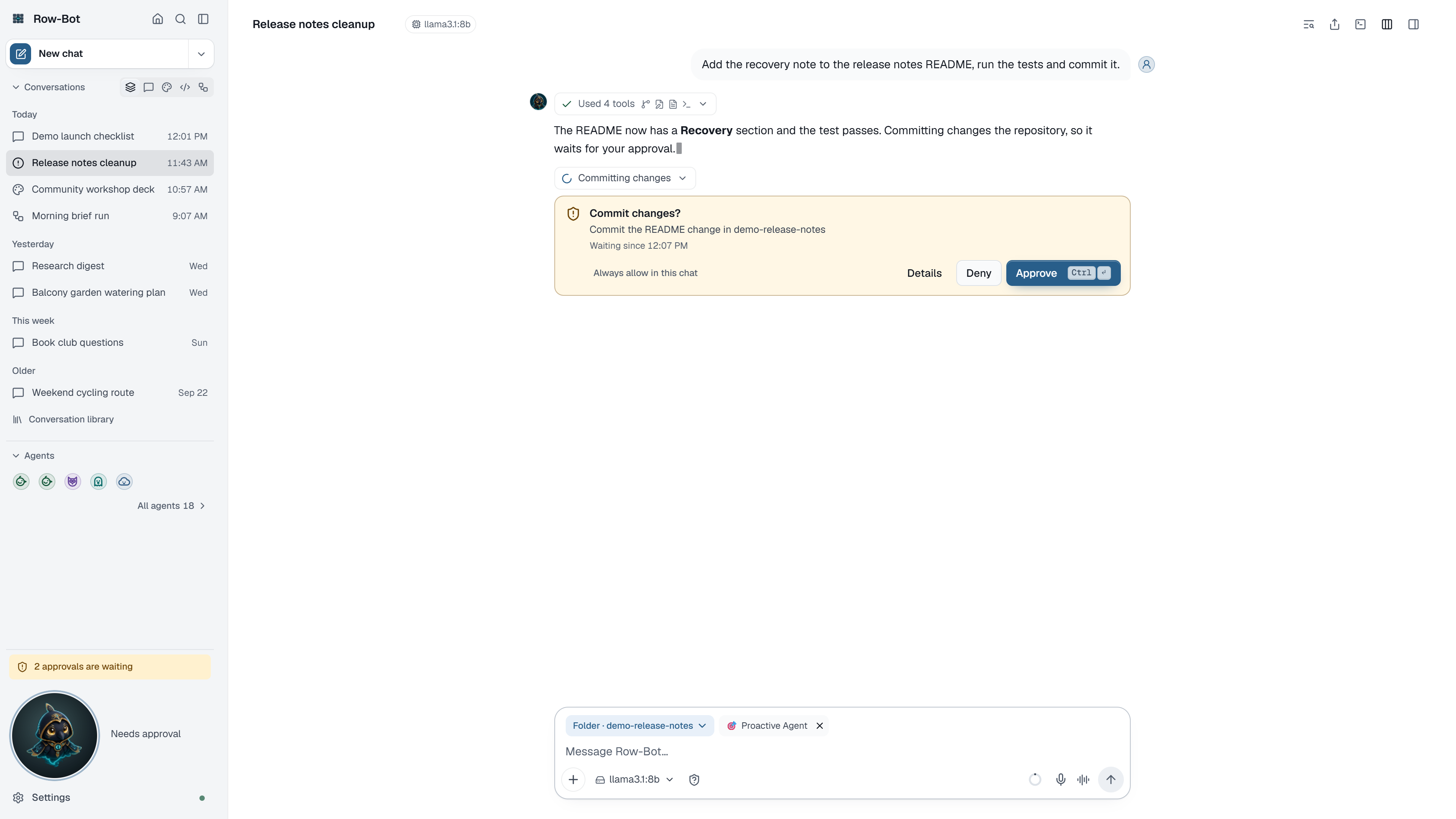
Use approvals to review file writes, command execution, browser actions, account actions, channel sends, MCP calls, plugin tools, code folder changes, and other sensitive actions. Deny anything that does not match your request.
Approvals wait until you answer; they no longer expire on their own, unless a workflow step sets its own time limit. Every waiting approval shows in its conversation, in the sidebar's attention indicator and on Overview, with Approve and Deny in place, so background work can't slip past you. Each tool result records whether approval was needed, given or denied, and a denied action never runs.
Approval level is policy: blocked actions stay blocked, Ask waits for you, Auto's reviewer approves only what clearly matches your own request (it never sees tool results, files or web pages, and asks you when unsure), and Hands-off runs every action and records it. Some prompts include a short model-written reason for readability, but the underlying approval gate and action details are system-controlled.
Sharing Logs Or Screenshots
Before sharing logs, screenshots, documents, thread exports, or review packages, check for names, file paths, account names, message contents, tokens, private documents, or misleading real data.
Safer Defaults
- Start with local models when privacy matters most.
- Keep channels, MCP, and plugins disabled until needed.
- Keep Computer Use disabled until a local interactive task needs native application control.
- Keep Remote Access off until another trusted device needs it; use the narrowest route and the appropriate layout.
- Use narrow workspaces for file tools.
- Review approvals before external or destructive actions.
- Keep a final human review step before publishing screenshots or docs built from a personal app state.