Profiles, Goals, And Agents
These three features work together but solve different problems. An agent profile is a reusable role and policy. A goal is an objective a conversation keeps working toward, turn after turn. An agent run is one piece of delegated work, with its own conversation, status and result.
For the mental model behind delegation and hand-offs, read How Profiles, Goals, And Agents Work.
Agent Profiles
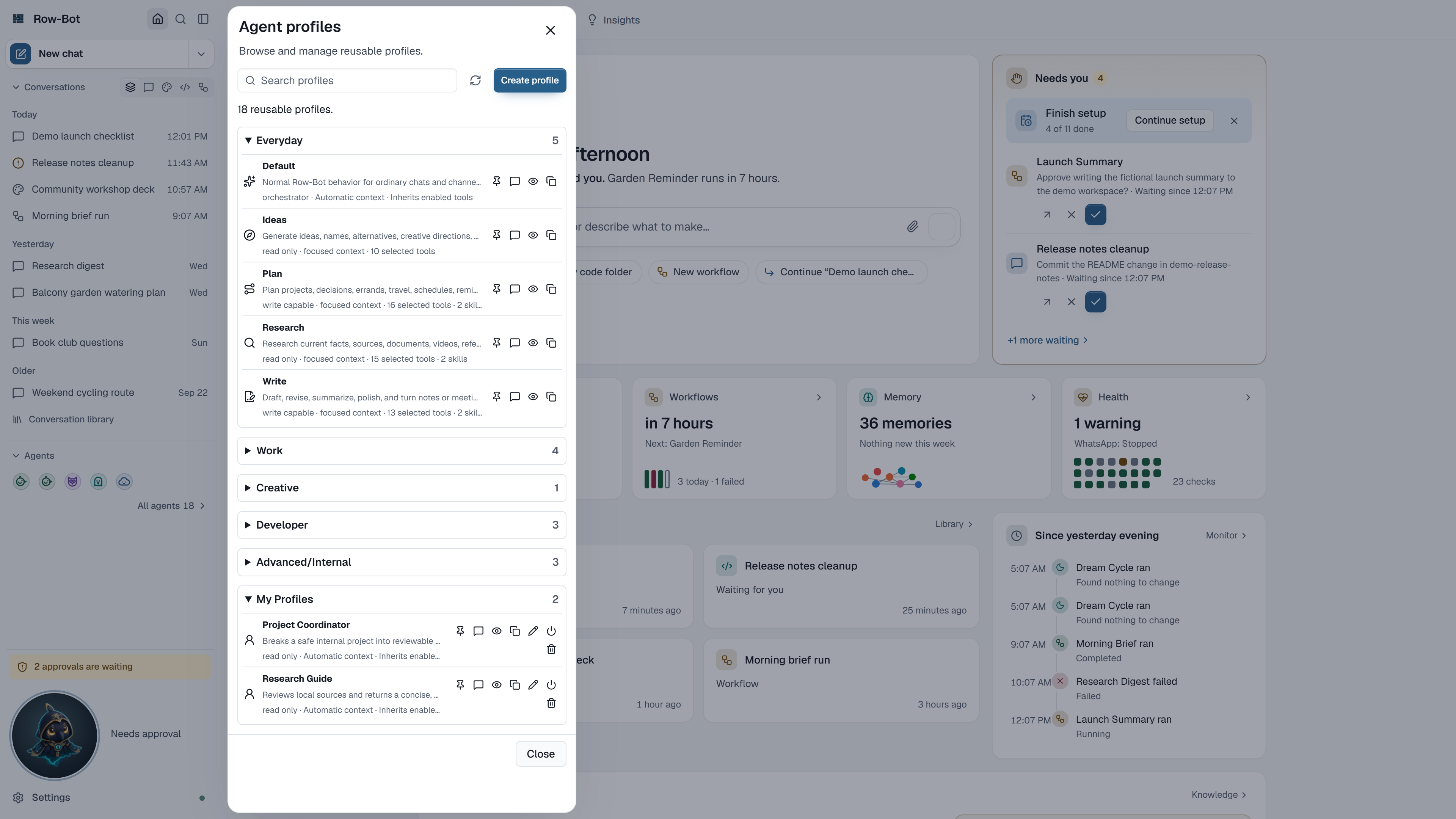
Open the Agents dialog with All agents in the sidebar's Agents section, All agents… under New chat's ▾, the Agents icon on the collapsed rail, or Agents in the command palette. It lists every profile in groups (Everyday, Creative, Developer, your own profiles, and profiles from workspaces, plugins or imports), with Search profiles and a scope filter.
Each profile row can:
- Pin to the sidebar: pinned profiles become favourites in the sidebar's Agents section and under New chat's ▾, one click from a new chat;
- Start chat with that profile;
- View, Duplicate, and, for your own profiles, Edit, turn on or off, or Delete.
Create profile describes a new role: its name, description and when to use it, instructions, capability (read only, write capable, or orchestrator), allowed tools and skills, context mode, workspace mode and approval mode. Keep the role narrow: describe the outcome, the sources it may use, and what it must not do.
To use a profile in an existing conversation, choose it from the composer's + › Agent, which lists each agent with a line on what it does. Profiles do not grant capabilities by themselves. A selected tool must still be enabled, available, and allowed by the conversation's approvals.
Goals
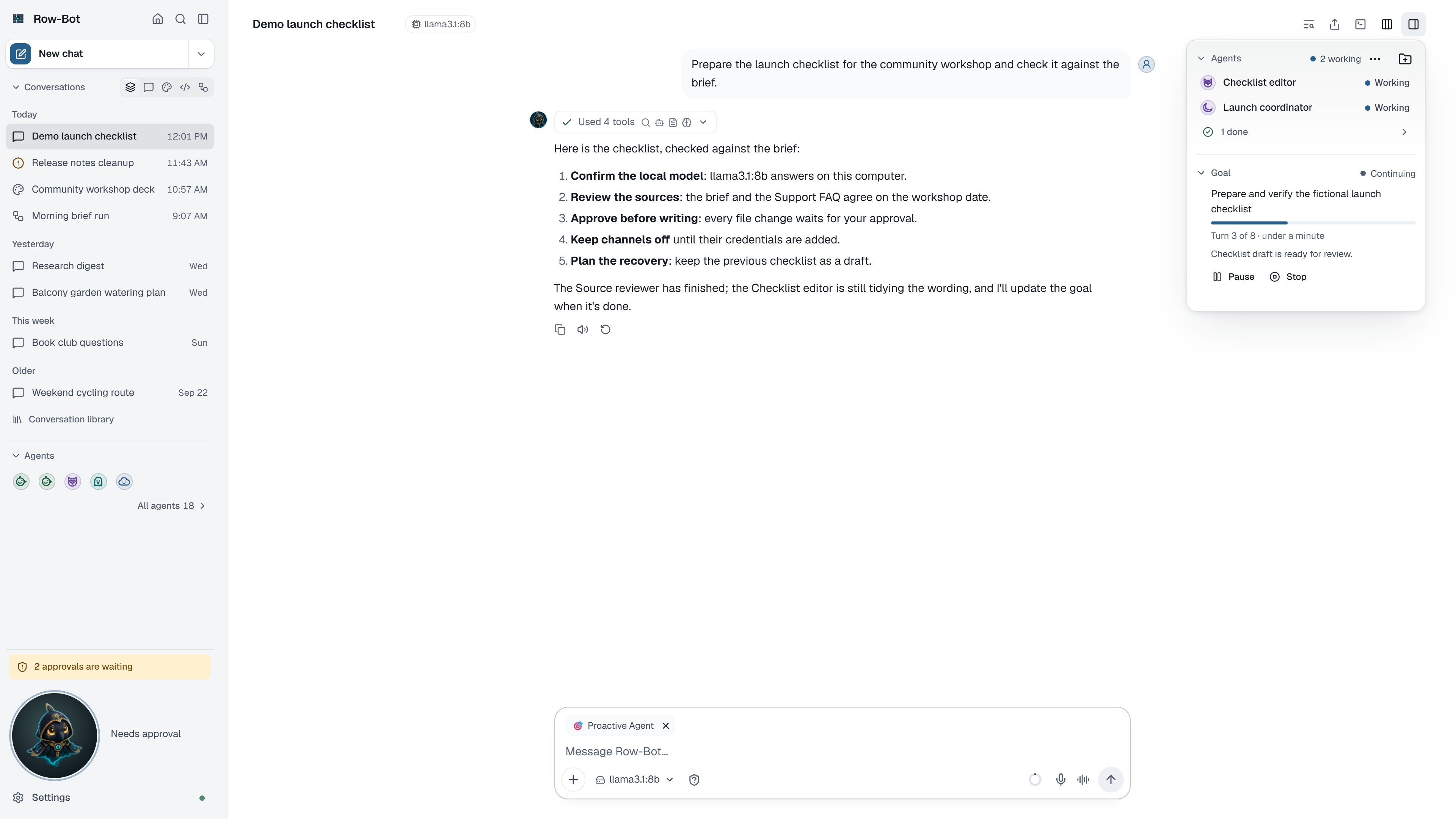
A goal is useful when work needs more than one turn. Set it from the conversation's details card: choose Set a goal, describe What should this conversation achieve?, and choose Start goal. Row-Bot starts at once and keeps going turn after turn; it stops for approvals and when it needs you.
- No turn limit by default. Overnight and multi-day goals keep going while they make progress. Set an optional Turn limit or Time limit (hours) when you want one. A default turn limit for new goals is in Settings › Models › Limits for long work.
- Smart stop. Row-Bot pauses the goal and says why when it stops making progress (no progress in the last 2 turns) or the same step fails 3 times. When a provider's usage limit stops a turn, the goal waits and continues by itself once the limit resets, if the provider says when.
- Checked every turn. After each turn Row-Bot checks the goal's progress. If it can't check it 2 times in a row, for example because the model it uses is unavailable, the goal pauses instead of going on unchecked, and you get a notification. Resume tries again.
- Pauses when Row-Bot closes. Goals that were working come back paused the next time you open Row-Bot, with one notice, such as "2 goals paused when Row-Bot closed". Choose Resume on a goal, in its conversation, to continue from its last saved turn. A goal waiting for your approval keeps waiting. A restart Row-Bot makes itself (installing an update) lets them continue by themselves.
- Visible usage. The card shows the goal's state (Working, Continuing, Waiting for your approval, Paused, Needs you, Done or Stopped), the turn it is on ("Turn 7", or "Turn 7 of 30" with a limit), how long it has been running and the tokens it has used.
- Pause, Resume and Stop control it. Stopping ends the goal; it does not delete the conversation or its evidence. Starting a new goal replaces the current one, and Earlier goals lists the ones before.
Delegated Agents
A conversation can delegate parts of its work to agents. Each agent works in its own conversation.
- In the transcript, the turn that started agents shows a small stub for each one, with its icon, name and live status (working, waiting for you, done, failed or stopped). A failed agent's stub says why. Click a stub to open that agent's conversation.
- In the details card, Agents lists them, live and failed ones first. Message sends an agent a note it reads at its next step; Stop ends its run.
- In an agent's own conversation, the header leads back to the parent conversation.
- When an agent needs approval, the request appears in the parent conversation and everywhere else approvals show. See Tools, Approvals, And Terminal.
- If work was interrupted before it finished, for example by a restart, the card and Overview's Needs you offer Resume agent work or Dismiss agent work.
A completed agent's result is evidence for the parent, not automatic permission to write files, send messages, commit code, or publish.
For coding work, a parent can assign an agent to an existing local folder. Row-Bot registers that folder as the agent's code folder and applies writer ownership to the resolved folder, not merely the process working directory. Agents assigned to distinct folders or worktrees can write in parallel; writers targeting the same folder wait and run serially.
New runs also receive a checkpointed work budget. Settings › Models › Limits for long work shows the recommended steps per run, helper levels, helpers at a time, and the optional helper time limit. Extra agents wait in a first-in, first-out queue when capacity is full; changing a setting affects new runs, not work already in progress.
If a run appears stuck, open its conversation to read its last update before stopping it. If several agents edit the same resource, give them distinct folders or worktrees, narrow their ownership, or run them sequentially. Keep consequential final actions with the parent and a human approval point.
Row-Bot saves the parent's first continuation checkpoint when asynchronous delegation begins. If a child process outlives its launching shell or the app restarts, resume repairs only genuinely unanswered tool calls with an interruption marker, then wakes the parent from durable child results. It does not replay previously executed work. If a checkpoint cannot be repaired safely, the run remains stopped for review.
Repeated model-and-tool states are detected before a run can loop indefinitely. The fourth identical no-progress state is blocked; a fifth ends the run cleanly with a durable reason. Reaching a configured work limit also finalizes the run instead of leaving it marked as active.
What Is Saved
Profiles, goals, agent runs, edges, progress, results, and evidence are stored in the active local data directory. Favourite profiles are remembered on each device. Provider prompts still follow the privacy terms of the model route selected for each run.