Workflows
Workflows are repeatable Row-Bot tasks. Use them for things you want to run again: a morning brief, inbox follow-up, document digest, research check, report draft, or channel delivery. A reminder is a simpler kind that just tells you something at a chosen time.
For the execution model behind schedules, persistent runs, approvals, and delivery, read How Background Workflows Run.
Where To Find Workflows
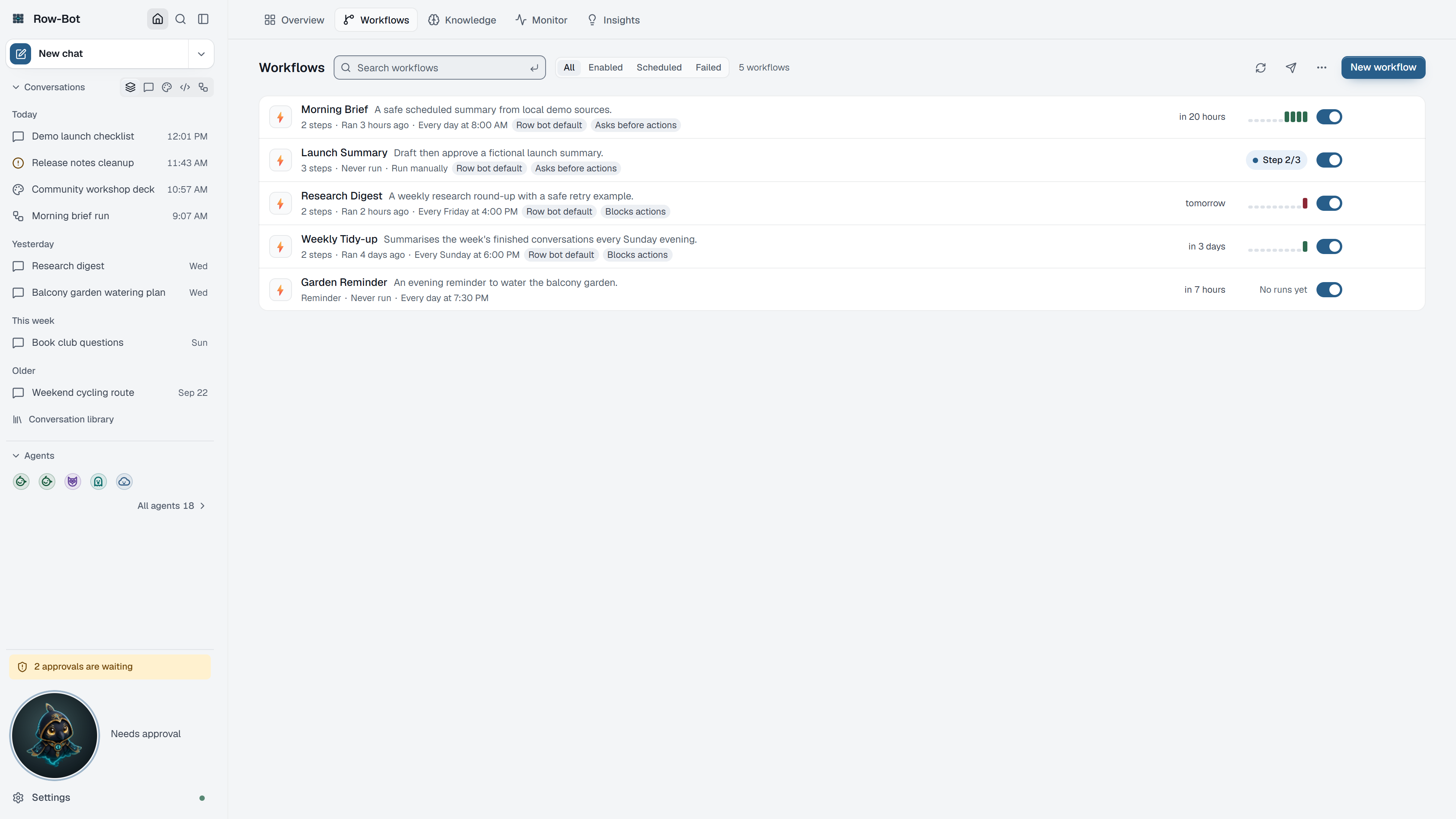
Choose Home, then the Workflows tab. Overview's New workflow quick start and the ⌘K command palette (Run …) also reach them.
The Workflow List
- Each row shows the workflow's name, when it runs next, its last runs, and small tags for its steps, profile and approvals. Hands-off stands out.
- Run starts the workflow at once, in one click. The row then shows its live state and Stop.
- Enable or Disable turns the workflow's schedule on or off.
- Edit opens the workflow editor.
- The row's ⋯ menu opens Run history, Edit workflow steps, Workflow settings or the workflow's conversation, and can duplicate or delete the workflow.
- Search workflows, the filter and Select workflows help with long lists.
- Delivery defaults choose the external channels every workflow also sends results to, unless a workflow chooses its own. The app always shows the result.
Create A Workflow
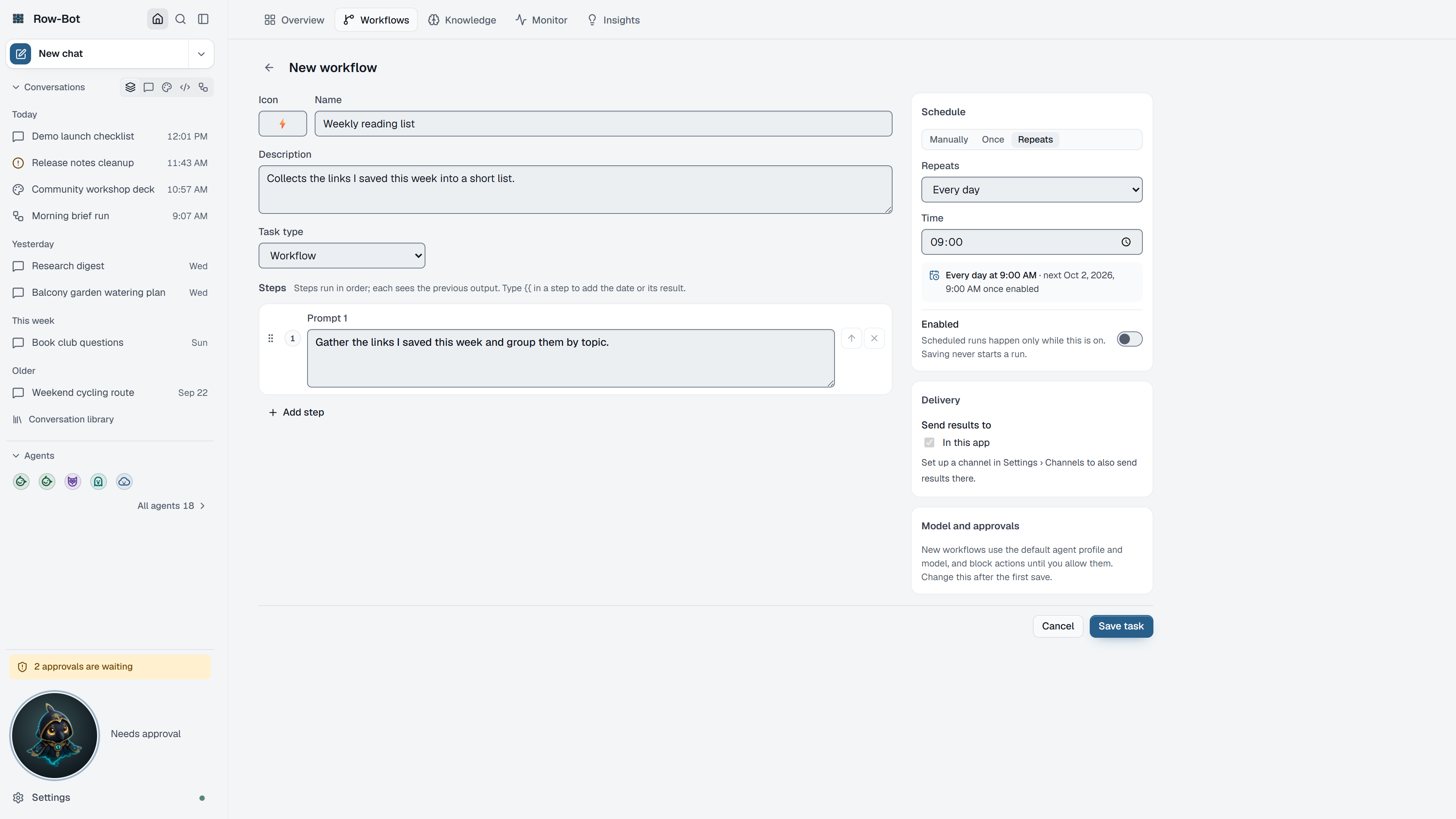
- Choose New workflow. The editor opens on the page, as editing does.
- Give it a name, an icon and a short description, and choose Workflow or Reminder.
- Write the Steps: what Row-Bot should do first, then what next. Each step can use the previous step's output; drag steps, or use the arrow keys, to reorder them.
- Choose When it runs: manually, at a date and time, or repeating (every day, weekdays, chosen days, every few hours or minutes, or a custom cron expression).
- Choose Send results to: follow your defaults, choose channels only for this workflow, or keep results in the app.
- Under Model and approvals, pick an Agent profile and Approvals: Ask before actions, Block actions, or Auto, within the profile.
- Save, then Run it once and review the result.
Advanced Workflows
- Edit workflow steps opens the step editor, with a builder and a step graph. Besides prompts, steps can be conditions, approvals, running another workflow, delegating to an agent, waiting for agents, and notifications.
- The step graph shows the steps as a flowchart, from Start to End: arrows after a condition say yes or no, and after an approval approved or denied. Click a step (or press Enter on it) to edit it beside the chart. A step that points to a removed step says so on its card, and steps nothing leads to sit under Not reached. List shows the same steps in order; your choice is remembered on this device.
- Workflow settings chooses the model, whether runs reuse one conversation, a concurrency group, and the trigger: manual and scheduled runs only, When another workflow completes, or Webhook (HTTP POST). A webhook trigger creates a private secret when you save; download its configuration and keep it private.
Workflows With Apps
- Start from a template, below the workflow list, offers workflows that use apps: GitHub pull-request digest, Linear triage and Notion weekly summary. Each is created switched off, with a schedule and Ask before actions approvals; turn it on when it suits you. A template whose app isn't connected shows Connect instead. Templates never add a webhook or change how Row-Bot can be reached.
- In the step editor, a prompt step's Apps this step uses limits that step to the apps you choose, as mentioning an app in chat does. With none chosen, the step can use every app the workflow may. The workflow's Agent profile and approvals still apply.
- On Auto, a reviewer approves what matches the workflow's own steps; anything else, including an app action its access asks about that the reviewer isn't sure of, pauses the run and waits for you. On Hands-off, which you turn on in the workflow's settings, nothing pauses for approval.
Approvals In Workflows
An approval step, or an action that needs approval, pauses the run until you answer. It waits as long as needed unless that step sets its own time limit. Answer it from the sidebar's attention indicator, Overview's Needs you, the workflow's conversation, Buddy, or a channel that supports approvals; an answer in one place resolves it everywhere. While a run waits, that workflow's next scheduled run is skipped and says so.
What Is Saved
Workflow definitions, schedules, run history, delivery defaults, and status are local Row-Bot data. Results may be sent to channels only when configured and selected.
Safety
Avoid workflows that send messages, write files, start servers, or call external systems without a review point. Use approvals for actions that can affect files, accounts, channels, MCP servers, plugins, or external services. Remember that Run starts at once, including any delivery outside the app.
Troubleshooting
- If a workflow does not run on schedule, check that it is enabled and that an earlier run isn't still waiting for approval.
- If delivery fails, check the selected channel and its Settings page.
- If a run waits for approval, answer it from the attention indicator or Overview.
- If results are too broad, split the workflow into smaller steps.