Settings: Models
The Models page decides which model does each job. Providers supply the models (see Settings: Providers); this page picks between them.
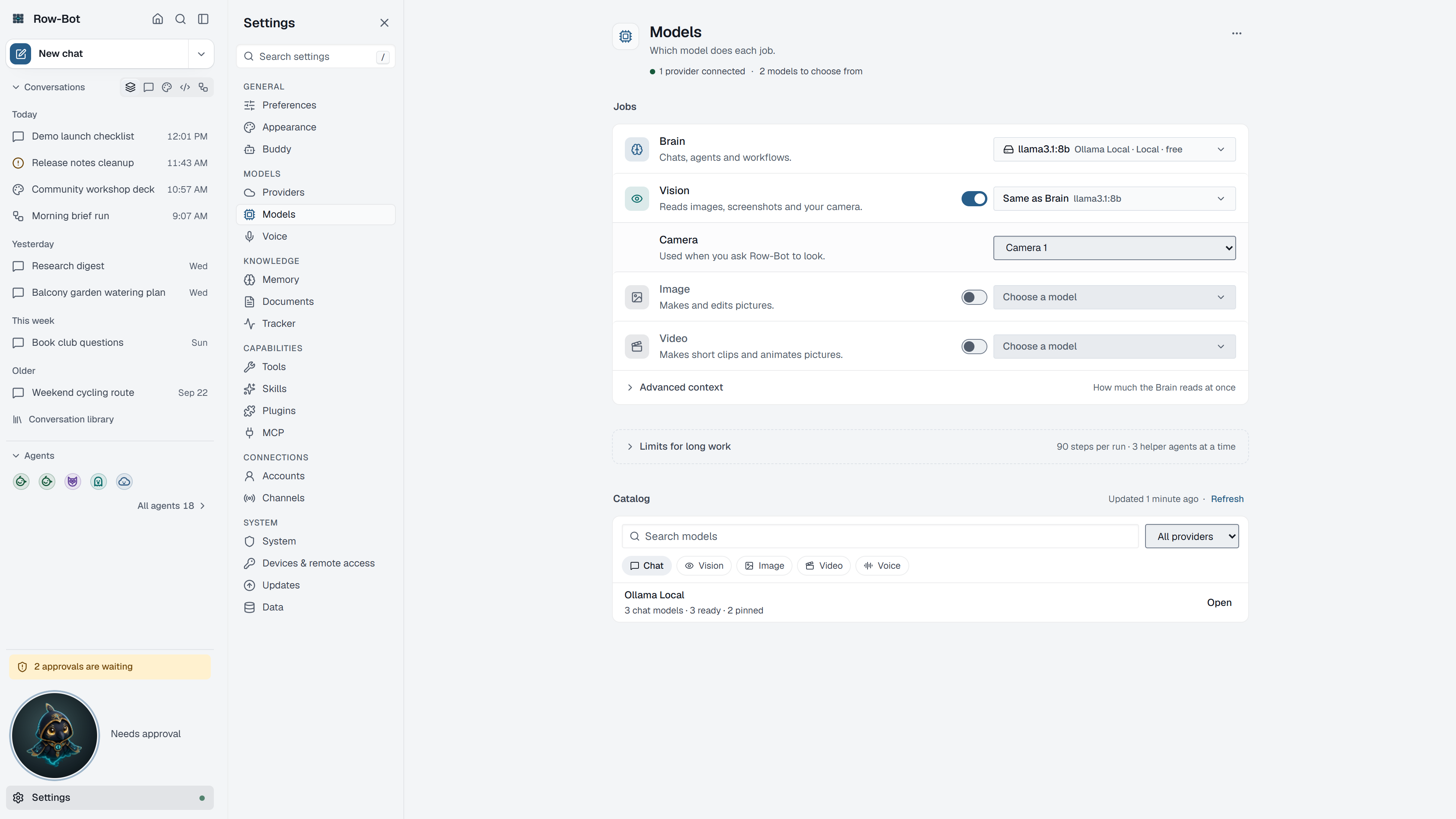
Where To Find It
Open Settings, then choose Models in the Models group, or search for it with Find a setting.
Jobs
Each job has its own picker, using the same grouped, searchable list as the composer's model picker (provider, how it is paid for, and whether it is available):
- Brain is the default model for new conversations and background work. A conversation can still choose its own model in the composer. Background work tied to a conversation, such as checking its goal's progress or compacting it, uses that conversation's model; memory extraction and Dream Cycle use Brain. Either way, Row-Bot uses the lowest reasoning effort that model offers, when it knows the model's reasoning choices.
- Vision reads images, screenshots and your camera. Leave it as Same as Brain if your Brain model can see, or choose another model. Choose a Camera here too.
- Image makes and edits pictures.
- Video makes short clips and animates pictures.
Turn Vision, Image or Video off when you don't want that job done at all.
Reading Limit
Reading limit sets how much text the Brain model reads at once. Automatic uses what the model supports; Limit… sets a smaller number of tokens, useful for local models on smaller computers.
Limits For Long Work
These limits apply to new runs; work in progress keeps the limits it started with. Recommended limits restores the defaults.
| Limit | Meaning |
|---|---|
| Steps per run | Model-and-tool rounds one run may take. |
| Helper levels | How deep delegation goes; 1 lets helpers work but not start helpers of their own. |
| Helpers at a time, per agent | Delegated agents one agent runs at once; more wait in line. |
| Helpers at a time, in total | Delegated agents running across the whole app. |
| Helper time limit (seconds) | How long one helper may work; 0 means no limit, and time waiting in line doesn't count. |
| Goal turn limit | The turn limit new goals start with; 0, the default, means no limit. Each goal can change it. |
Catalog
The Catalog lists every model your providers offer. Search it, filter by provider and job, and pin the models you use often so they appear first in every picker. Refresh catalog asks your providers what is available now.
Common Workflow
- Connect a provider, then choose your Brain model.
- Choose Vision, Image and Video models if you want those jobs.
- Pin one everyday model and one stronger tool-capable model.
- Keep the recommended limits unless you have a measured reason to change them.
What Is Saved
Job models, limits and pins are global preferences. A conversation keeps its own model when you choose one in it.
Privacy And Safety
A hosted model receives the prompts, images or files its job sends it. Choose local models for jobs that should stay on your computer.
Control-Level Reference
The generated Settings Controls reference lists every searchable setting on this page with its deep link, search keywords, and any dependency or security notes.
Troubleshooting
- If a picker is empty, connect a provider first.
- If a model is missing, refresh the catalog and check whether its provider is connected.
- If a model shows as unavailable, read its reason; reconnecting its provider usually fixes it.
- If a small local model fails before answering, lower the reading limit or choose a more capable model.