Model Picker
The model picker in the composer chooses which model answers in the current conversation. It is where provider setup becomes visible in day-to-day use.
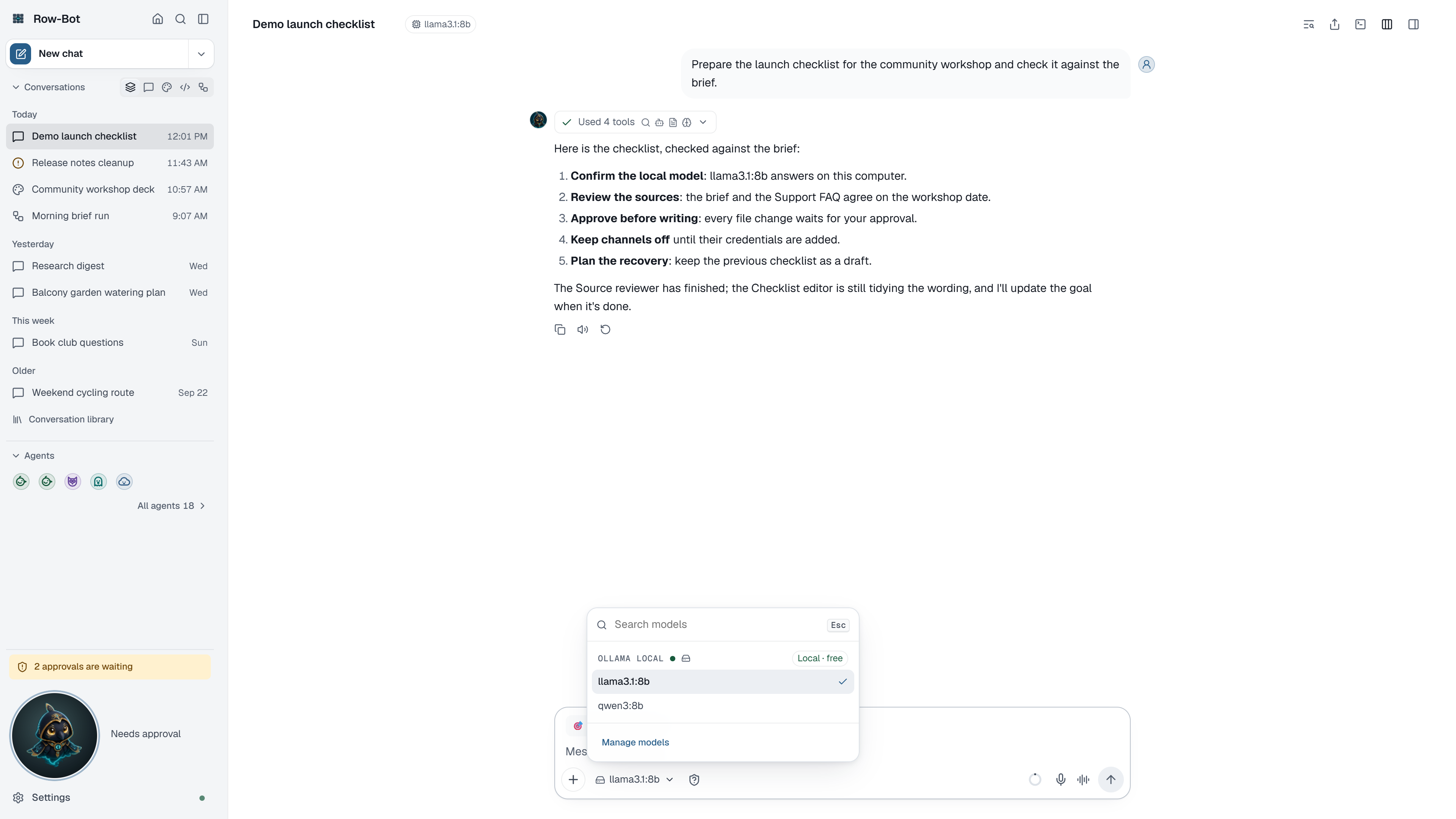
Where Models Come From
Models appear after Row-Bot discovers them from a connected provider or local runtime:
- Local Ollama models come from the Ollama service running on your computer.
- Subscription models come from a ChatGPT, Claude or Grok account you signed in to.
- Pay-per-use models come from a provider connected with an API key in Settings › Providers.
- Custom endpoint models come from the compatible endpoint details you provide.
- Models you pin in Settings › Models appear first.
The same list is used everywhere a model is chosen: the composer, and the Brain, Vision, Image and Video pickers in Settings › Models.
Using The Picker
- Search models narrows long lists; Recent shows the models you used last.
- Models are grouped by provider, each marked Connected or Not connected, and tagged with how they are paid for: Subscription, Pay per use, Credits, or Local · free (runs on this device).
- A model that can't be used right now, for example because its provider is disconnected, shows as Unavailable with the reason.
- Chat only marks models that can't use tools.
- The choice applies to this conversation only; it doesn't change your default model in Settings › Models.
Choosing Well
Use a smaller or local model for quick private chats. Use a stronger tool-capable model for workflows, designs, code folders, long context, or multi-step tool use. For local and self-hosted endpoints, prefer a context window large enough for Row-Bot's instructions and tool schemas.
Reasoning choices belong to the exact provider-qualified model, not just its display name. After choosing a supported model, use the conditional Thinking control described in Reasoning Controls.
Pinning Models
Open Settings › Models, find a model in the Catalog, and pin the ones you use often. Pinning doesn't create a new model; it puts an existing one at the top of every picker.
Troubleshooting
- If the picker says there are no models yet, choose how Row-Bot thinks in Setup, or connect a provider in Settings › Providers.
- If a model is missing, refresh the provider in Settings › Providers, then refresh the catalog in Settings › Models.
- If a model shows as unavailable, read its reason; reconnecting its provider usually fixes it.
- If a model appears but fails with tools, choose a model that isn't marked Chat only.
- If custom endpoint models look duplicated, use the provider-qualified name.