Settings: Memory
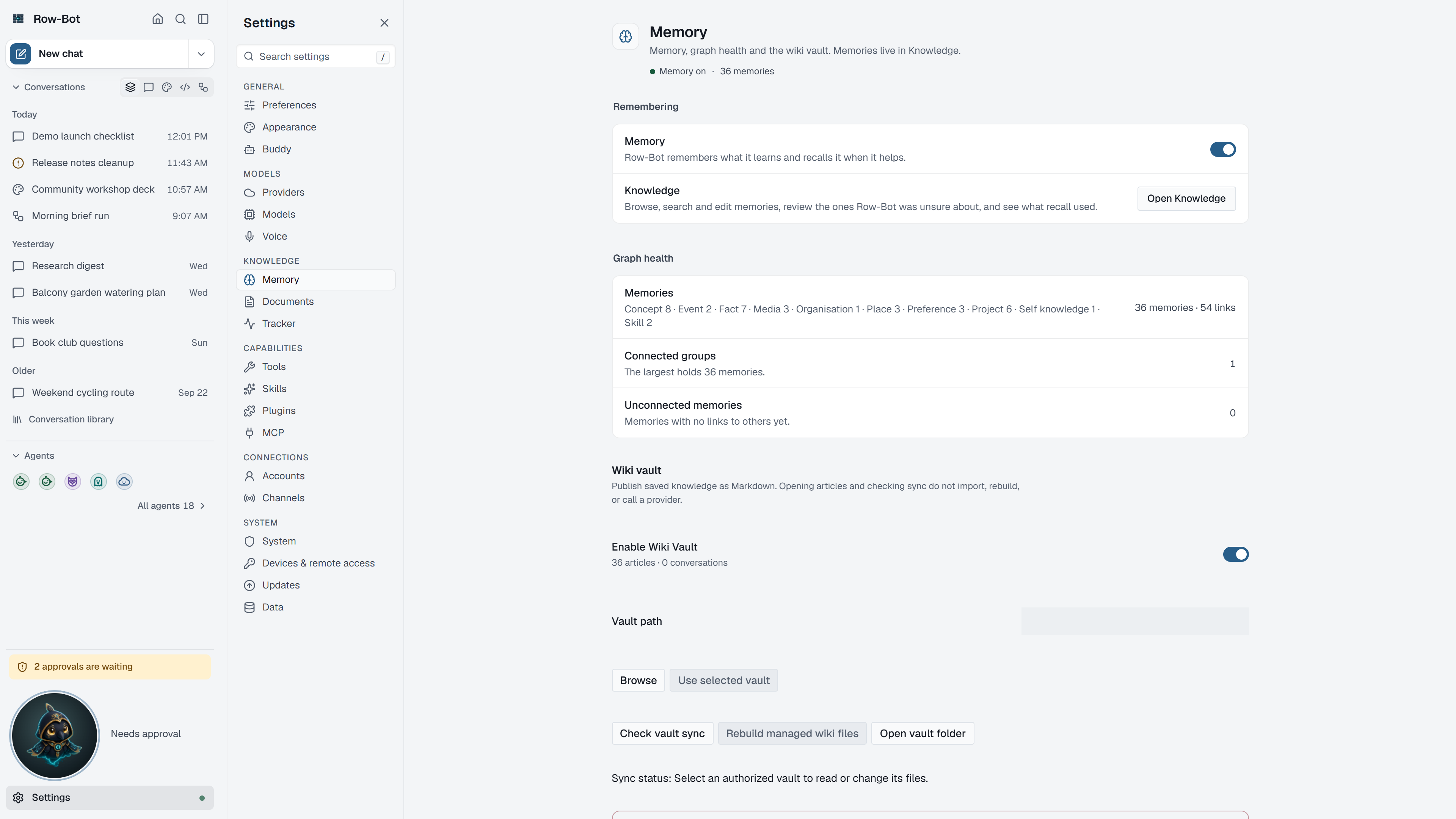
The Memory page holds the settings for what Row-Bot remembers between conversations. The memories themselves are in Home › Knowledge, where you search, review, edit and delete them. See Knowledge.
Where To Find It
Open Settings, then choose Memory in the Knowledge group, or search for it with Find a setting. Old links to Settings › Knowledge or Settings › Wiki open this page.
Remembering
Enable Memory decides whether Row-Bot saves useful facts from conversations and recalls them later. A link opens Home › Knowledge to manage what is saved.
Graph Health
Graph health counts your Memories, how many Connected groups they form, and how many Unconnected memories stand alone. A memory graph thumbnail opens Home › Knowledge. Many unconnected memories usually means Dream Cycle or a review would help.
Wiki Vault
Wiki vault writes your memories as linked Markdown articles in a folder you choose, and brings your edits back. See Wiki Vault.
Delete All Knowledge
Delete all knowledge permanently removes the saved graph after reviewing exactly what will go. Row-Bot-managed wiki files and local indexes are cleaned up; files outside Row-Bot's managed wiki are kept. Back up first if you might want it back.
Related Settings
- Dream Cycle's hours are in Settings › Preferences › Overnight tidy-up.
- Where memory and document search runs, and its search model, are in Settings › Documents.
Common Workflow
- Keep memory on if you want Row-Bot to remember useful details.
- Install the private search model in Settings › Documents before building a large memory.
- Review and correct important memories in Home › Knowledge.
- Turn on the wiki vault when you want a readable local copy outside the app.
What Is Saved
Memories live in local Row-Bot data. They are sent to a model provider only as relevant context in a conversation that uses that provider.
Privacy And Safety
The wiki vault is a folder other software can read or sync; treat it as an export. Deleting all knowledge cannot be undone without a backup.
Control-Level Reference
The generated Settings Controls reference lists every searchable setting on this page with its deep link, search keywords, and any dependency or security notes.
Troubleshooting
- If recall feels stale, rebuild the memory index in Settings › Documents.
- If Row-Bot remembers something wrong, edit or archive the memory in Home › Knowledge.
- If Dream Cycle is noisy, change its hours or turn it off in Settings › Preferences.