Settings: Providers
Providers are the model services Row-Bot can call. This page answers whether each provider is connected, what kind of credential it uses, and whether Row-Bot has enough information to use it for chat, tools, designs, code, voice, or embeddings.
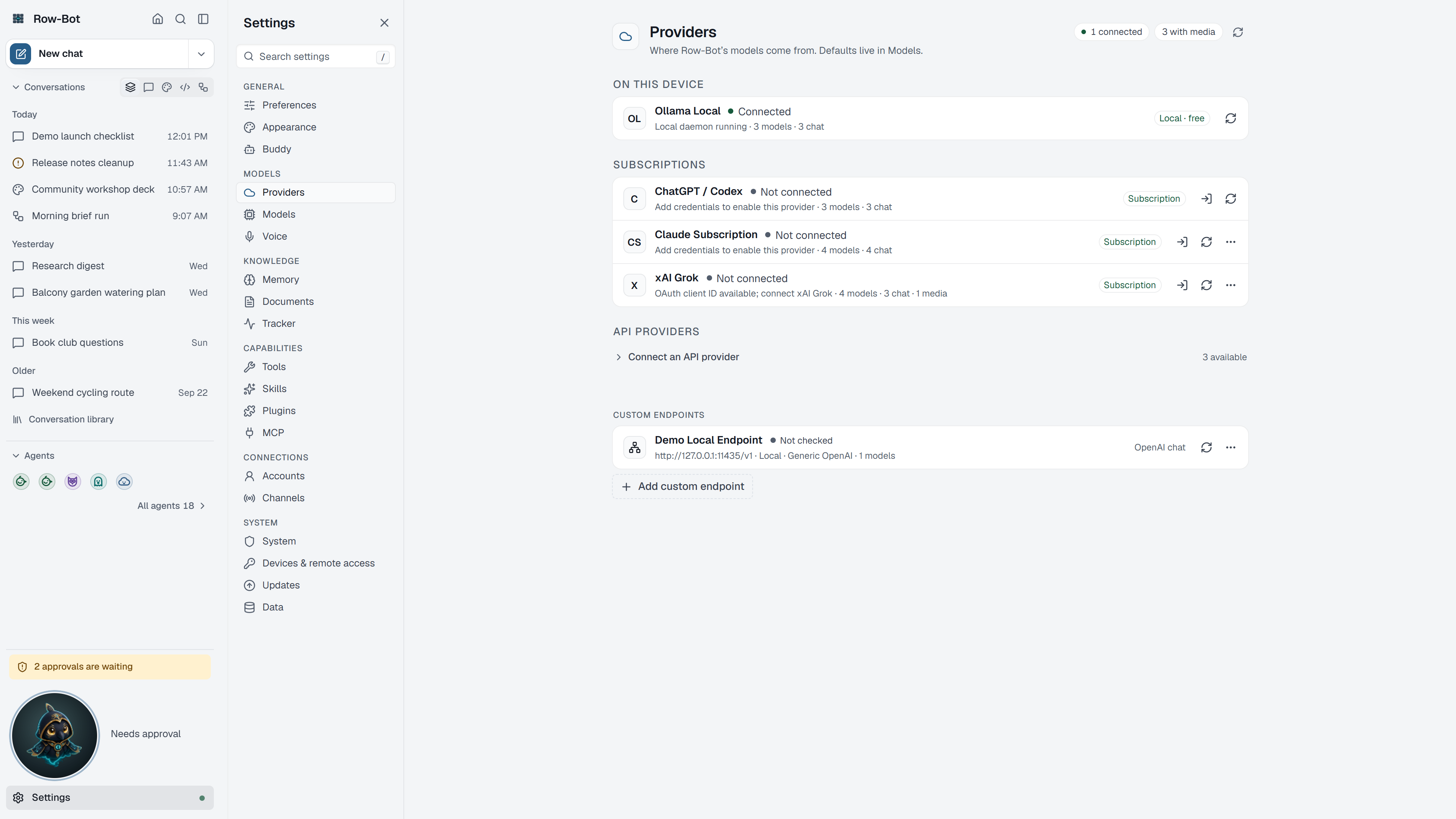
Where To Find It
Open Settings, then choose Providers in the Models group, or search for it with Find a setting.
Controls
- Connection Status summarizes how many providers are connected, local, API-based, subscription-based, or media-capable.
- Local providers show runtimes such as Ollama. Refresh checks what the local service currently exposes.
- Subscription accounts show providers that use a plan you already pay for: ChatGPT / Codex, Claude (your Claude plan) and xAI Grok. Use the row's actions to set one up, reconnect it, test it or refresh its models.
- API providers show services that need an API key or compatible endpoint. Their credential buttons open the setup flow for that provider.
- xAI API catalog refresh also discovers live image-generation models and their supported output formats, aspect ratios, resolutions, and quality choices. Row-Bot keeps that capability metadata separate from ordinary chat models.
- Custom endpoint providers let advanced users point Row-Bot at OpenAI-compatible servers such as LM Studio, vLLM, llama.cpp, LocalAI, LiteLLM, or SGLang.
- Custom endpoint Advanced settings can describe reasoning mode, a thinking budget, returned reasoning content, and whether preserved reasoning may be replayed to that endpoint.
- Runtime tests check whether a provider can handle the kind of requests Row-Bot needs. A failed test keeps the provider visible but may stop Row-Bot from offering it for agent work.
Claude (Your Claude Plan)
Claude through your own Claude plan runs Claude Code on this computer for every reply, and uses your plan's limits. Row-Bot never sees, stores or refreshes your Claude sign-in: Claude Code signs in by itself.
- Install Claude Code from Anthropic's setup page.
- Open a terminal and run
claude auth login, then sign in with your Claude plan (Pro, Max, Team or Enterprise). - In Settings › Providers, choose Set up Claude on the Claude row, then Check again. The row says Ready with your plan's name, and Claude models appear in the model picker.
The row says what Claude Code reports: Not set up (Claude Code isn't installed), Not signed in (run claude auth login), Update needed (run claude update; Row-Bot needs Claude Code 2.1.263 or newer) or Couldn't check (run claude doctor in a terminal to see why). Claude Code signed in with an API key or another cloud counts as not signed in, so a reply never bills anything but your plan.
Row-Bot starts Claude Code with its non-essential traffic turned off: no telemetry, error reports or automatic updates come from these runs. Claude Code's own tools are off; when Claude asks for one of Row-Bot's tools, Row-Bot runs it after its usual approval check. The models are the ones Claude Code lists for your plan.
Earlier versions signed in to Claude inside Row-Bot. That sign-in is gone and its saved tokens were deleted when you updated; the Claude row says Set up again until Claude Code is ready.
Common Workflow
- Pick one provider path first: local Ollama for private local runs, a subscription account if you already use one, or an API provider if you prefer hosted models.
- Add credentials or sign in only through the provider row you intend to use.
- Refresh the provider so Row-Bot can discover available models.
- Open Settings › Models to choose which model does each job and pin the ones you use most.
What Is Saved
Provider connection state is global to the local Row-Bot app. Secrets are stored in the operating system key store when available; Row-Bot settings keep masked status and catalog metadata.
Privacy And Safety
Review credential, account, channel, provider, or tool settings before enabling features that can contact outside services. Local-only features stay on your machine until you ask Row-Bot to use a provider, account, channel, MCP server, plugin, or tool that sends data elsewhere.
Control-Level Reference
The generated Settings Controls reference lists every searchable setting on this page with its deep link, search keywords, and any dependency or security notes.
Troubleshooting
- If a provider is connected but models do not appear, refresh Providers, then refresh Models.
- If an xAI image model is missing or rejects a media option, refresh Providers so Row-Bot can use the live image-generation catalog. A quality choice that the endpoint rejects is retried once without that optional field; other generation failures are returned without an automatic duplicate request.
- If a runtime test fails, read the row message before changing credentials; the model may be chat-capable but not tool-capable.
- If local Ollama is missing, start Ollama and make sure at least one model is installed.