Settings: Voice
Voice gives Row-Bot microphone input and optional spoken output. Dictate turns speech into text for the composer. Talk is a conversation mode. Realtime voice uses a low-latency provider path when configured.
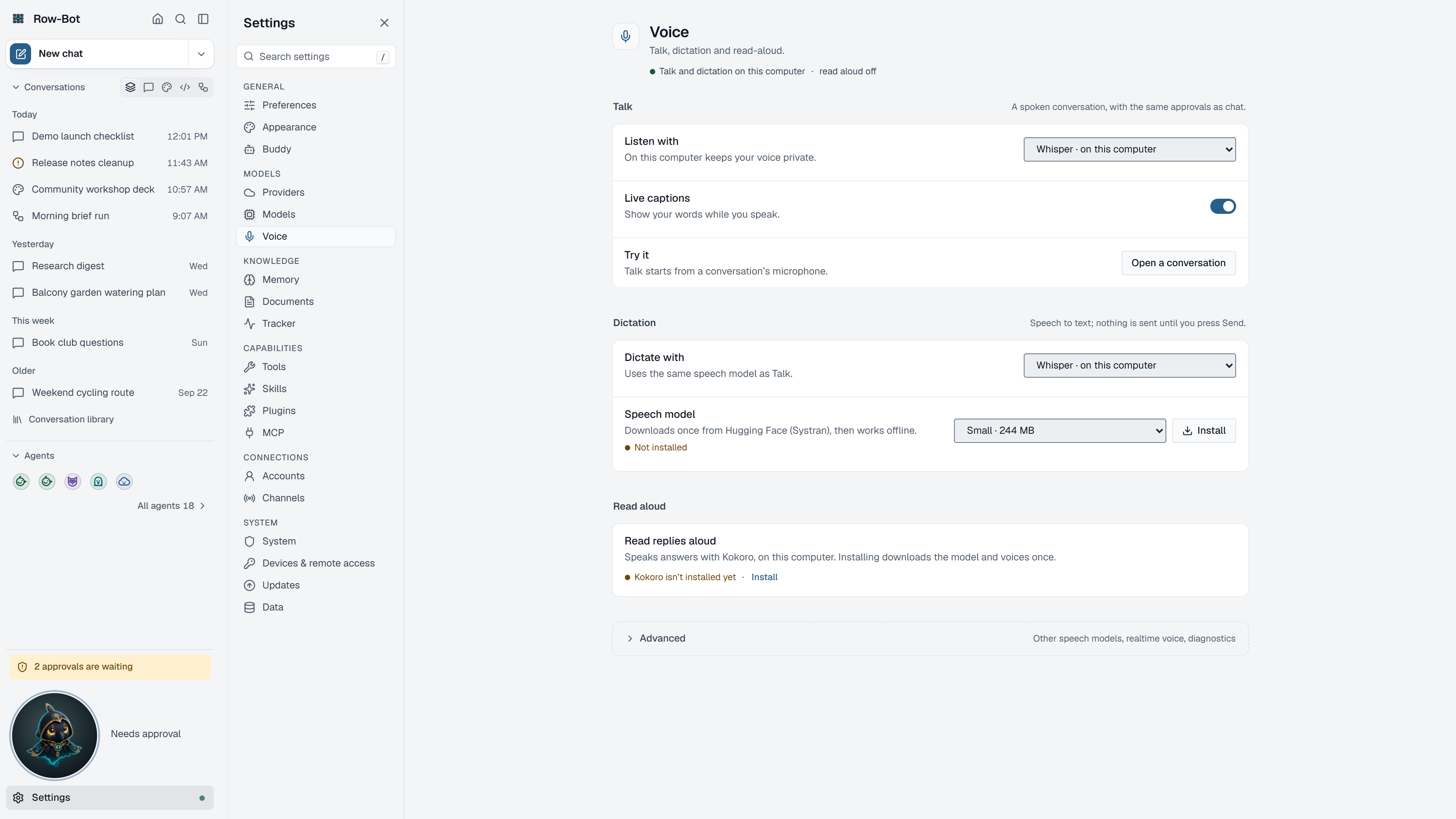
Where To Find It
Open Settings, then choose Voice in the Models group, or search for it with Find a setting.
Controls
- Talk settings decide whether spoken input submits directly to Row-Bot.
- Dictate settings decide whether speech is inserted into the composer for review before sending.
- Read-aloud settings control spoken assistant responses.
- Local voice controls choose Whisper, the default local STT engine, or the optional FunASR/SenseVoice engine for Talk and Dictate. Once SenseVoice is installed, Speech engine (Talk listens with, Dictation listens with) chooses it for each mode, in Talk and Dictation in the browser too.
- A saved Whisper size, SenseVoice model or read-aloud voice and speed applies to the next use, without restarting Row-Bot.
- Test voice, beside the read-aloud voice, plays the test phrase in this browser, not on the computer running Row-Bot.
- SenseVoice readiness shows whether the platform, packaged runtime, and verified local model snapshot are ready. Its install action is always explicit.
- Realtime voice controls use provider-backed low-latency voice models.
- Device controls select microphone and output devices.
- Voice Models shows runtime defaults and provider voice models.
- Diagnostics checks local audio and provider readiness.
Talk and Dictate controls live in the full chat composer, not the compact Buddy desktop overlay. If Buddy is undocked, use Open full thread before starting a microphone session; Buddy will continue to reflect the selected thread's response and approval state.
Common Workflow
- Use Dictate first if you want to review text before sending.
- Use Talk when you want hands-light conversation and are comfortable with immediate submission.
- Choose local Whisper for the default local path, or install and select SenseVoice Small when you want the optional FunASR engine.
- Treat the SenseVoice install as a deliberate approximately 940 MB ModelScope download. After verification, normal transcription stays local and cache-only.
- Choose realtime voice when latency matters and you accept provider requirements, cost, and internet use.
What Is Saved
Voice preferences are global. Transcribed text belongs to the active thread once submitted. The verified SenseVoice snapshot is stored under the active Row-Bot data directory. Provider-backed voice can send audio or transcript data to the selected provider.
Privacy And Safety
Review credential, account, channel, provider, or tool settings before enabling features that can contact outside services. Local-only features stay on your machine until you ask Row-Bot to use a provider, account, channel, MCP server, plugin, or tool that sends data elsewhere. The explicit SenseVoice install contacts ModelScope for the model download; it does not send audio, prompts, or usage data, and ordinary inference does not check for updates.
Control-Level Reference
The generated Settings Controls reference lists every searchable setting on this page with its deep link, search keywords, and any dependency or security notes.
Troubleshooting
- If the microphone is silent, check the selected input device and browser/app permissions.
- "SenseVoice isn't ready on this computer." means the engine chosen for Talk or Dictation needs installing: install it in Voice settings, or choose Whisper.
- If Test voice says "This browser couldn't play the test phrase.", check the browser's sound output and that the page is allowed to play audio.
- If SenseVoice is missing or invalid, use its install or reinstall action in Voice settings. Source installs also require the
voiceextra. - SenseVoice is unavailable on Intel macOS because the required CPU PyTorch and Torchaudio wheels are not published for that runtime; use local Whisper there.
- If realtime voice is unavailable, configure a compatible provider in Providers.
- If Talk submits too quickly, use Dictate mode instead.