First Launch
The first time you open Row-Bot, it asks one question: How should Row-Bot think? Your answer connects one working model, which becomes the default for new conversations. Everything else can wait for Setup Center. Every desktop, source, and official Docker install uses the same first launch.
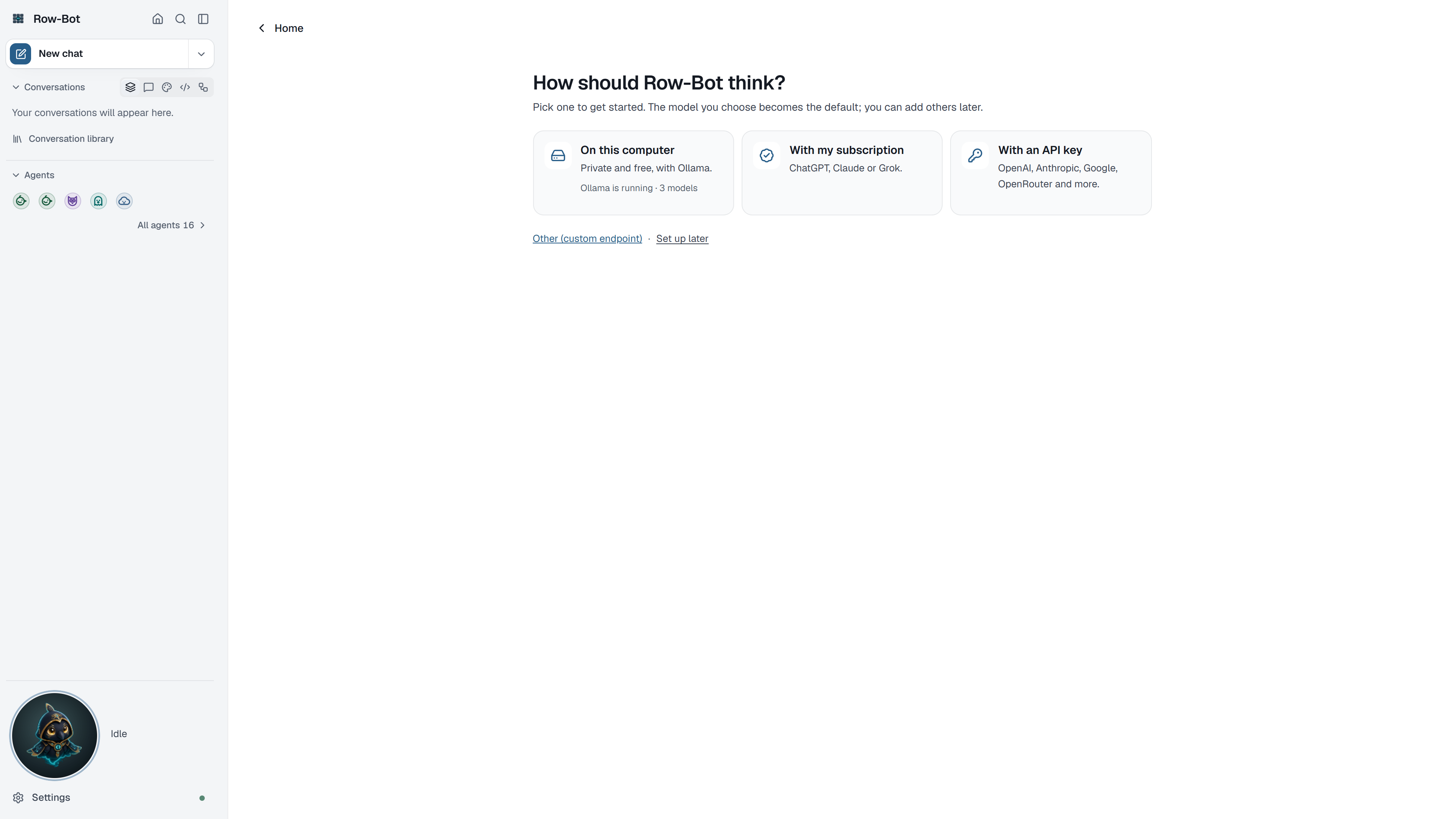
How Should Row-Bot Think?
Pick one of three cards. You can add other providers later.
| Choice | What it means | Tradeoffs |
|---|---|---|
| On this computer | Private and free, with Ollama. | Needs Ollama and a downloaded model; larger models need more memory and disk space. |
| With my subscription | ChatGPT, Claude or Grok. | Signs in to an account you already pay for and follows that provider's terms. |
| With an API key | OpenAI, Anthropic, Google, OpenRouter and more, or your own endpoint. | Needs an API key and internet access; the provider bills per use and receives the prompts you send it. |
- On this computer walks you through it: Install Ollama if it is missing, Start Ollama if it isn't running, Download a model, then Pick a model from the models on this computer.
- With my subscription lets you choose ChatGPT, Claude or Grok and sign in.
- With an API key lists the recommended providers first and the rest under More providers. Choose one, paste its key, and pick a model. Advanced users can add an OpenAI-compatible endpoint, such as LM Studio, vLLM, llama.cpp, LocalAI, LiteLLM or SGLang.
After you pick a model, Row-Bot sends it a short test message. A local model can take a minute to load the first time. If the model doesn't answer, choose Try again or Choose another model.
If Row-Bot finds Hermes Agent or OpenClaw on this computer, it then offers to bring that assistant's memories, persona and skills along. Choose Import from … or Not now; you can import later from Settings › Data.
Choose Set up later to look around first. Home then stops opening setup for the rest of this window, and Overview reminds you to choose how Row-Bot thinks.
In an installed Row-Bot, the first screen also says that Row-Bot downloads updates in the background, with a link to Settings › Updates, where you can turn that off. See Updates.
Setup Center
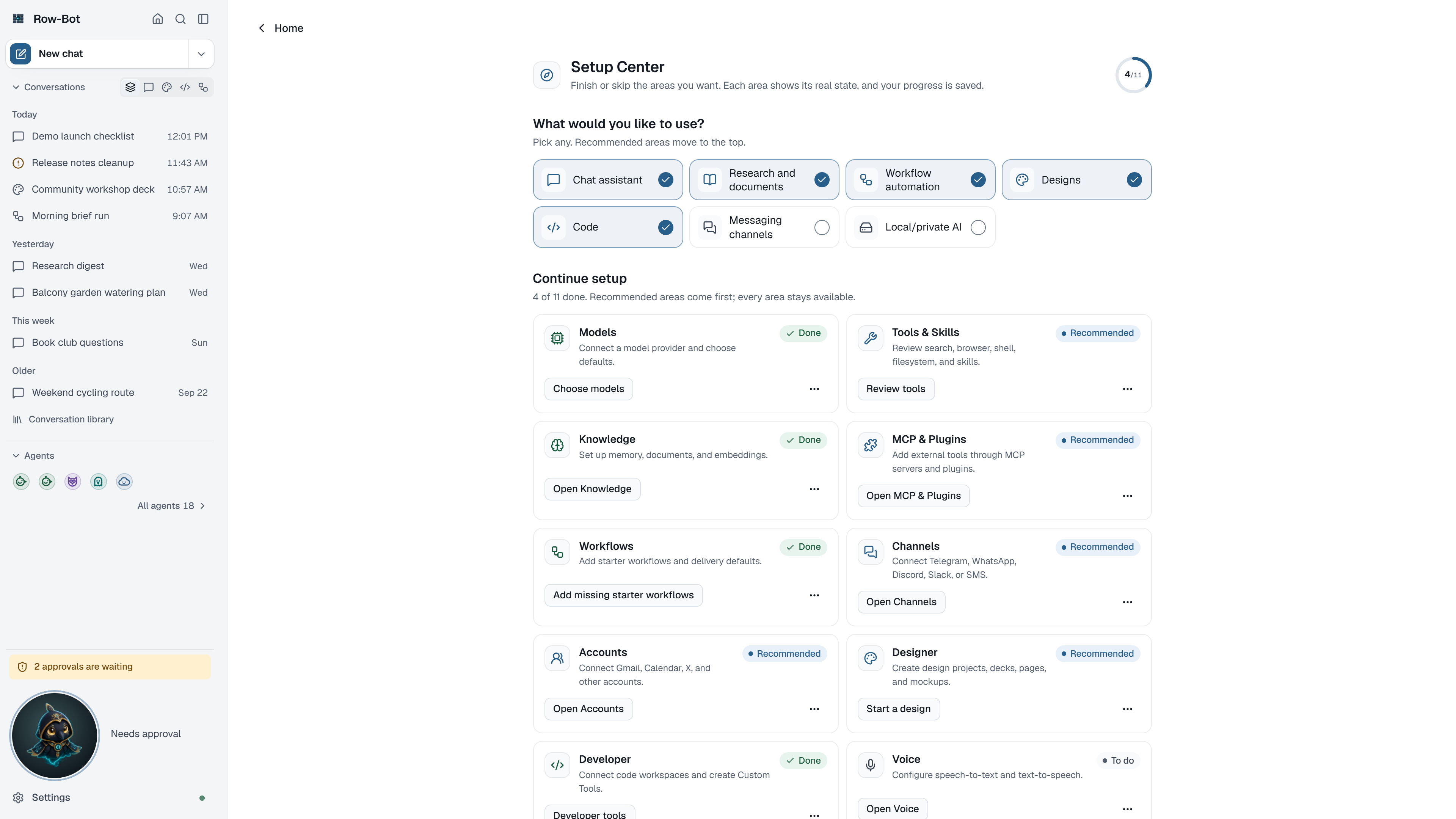
Setup Center is where you finish the rest whenever you like. Open it from Overview's Finish setup card or from the command palette (Setup Center).
- What would you like to use? Pick any of: chat assistant, research and documents, workflow automation, designs, code, messaging channels, or local and private AI. Recommended areas move to the top.
- Continue setup lists each area with one button that goes where it is set up: Models, Knowledge, Workflows, Designer (starts a design in a chat), Developer, Apps (the services you use, including your accounts and messaging channels, in Settings › Apps), Skills, Tools, Voice, and a Final Check that opens Monitor to run the diagnosis. Picking messaging channels moves Apps to the top.
- Each area's ⋯ menu marks it done or skips it. Areas Row-Bot can check, such as a connected model, tick themselves.
The links at the bottom import from Hermes or OpenClaw, or set up private knowledge search.
Install Private Knowledge Search
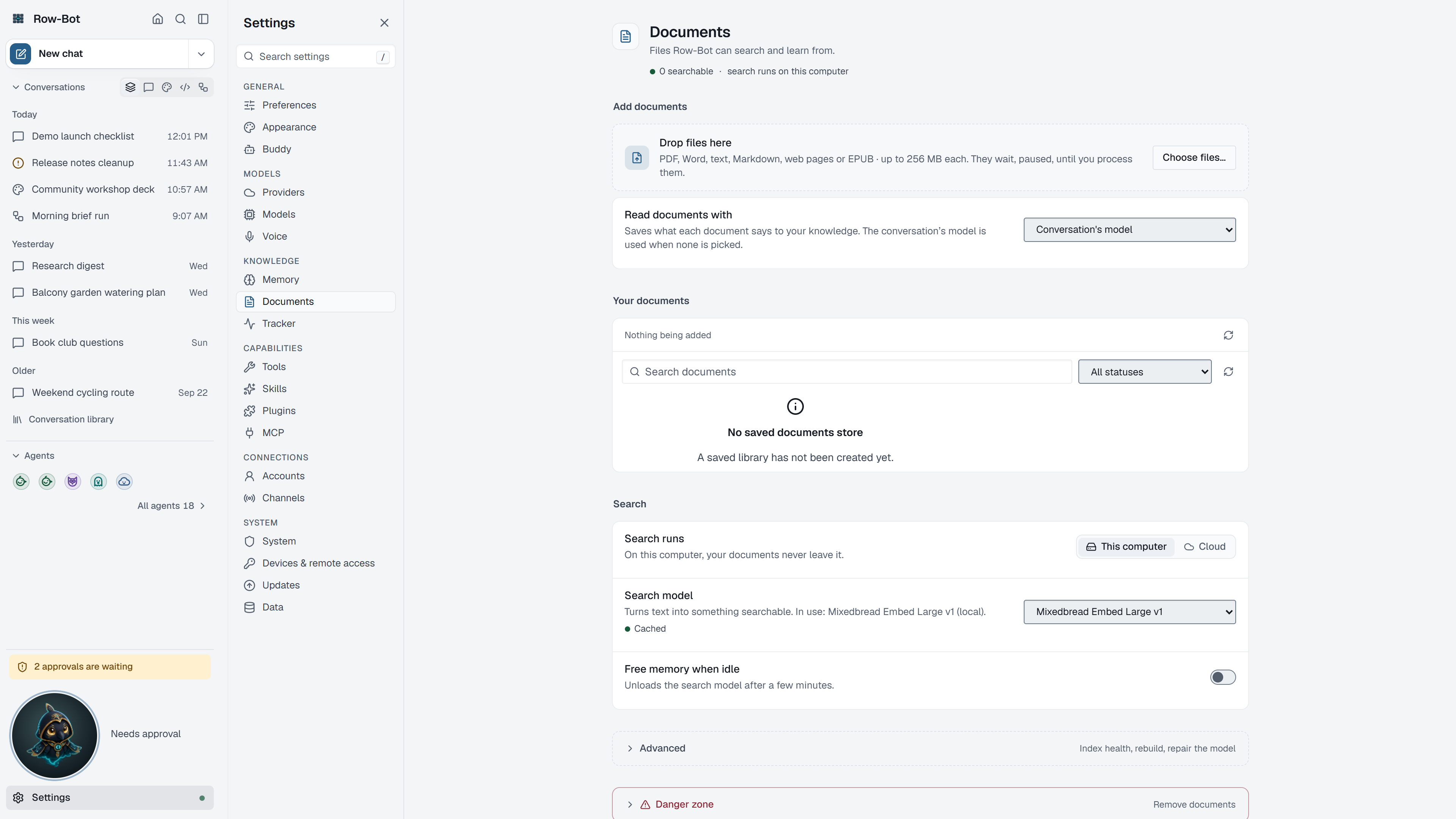
Row-Bot can search your memories and documents by meaning with Mixedbread Embed Large v1, a separate local model for semantic memory and document search. It is a 675 MB download from Hugging Face and is not the model that writes chat responses.
Install it from Settings › Documents (Setup Center's Set up private knowledge embeddings link goes there). Under Index health and maintenance, Search model files offers Download for the first install, Retry to load an already cached model again, and Repair to replace a damaged download. Files go into Row-Bot's private cache; documents and memories are not uploaded, and normal recall stays offline after the download. Docker keeps this cache in its named /data volume.
Until it is installed, Row-Bot continues with bounded lexical and graph fallback, so chat and memory do not stop working. Rebuild the document and memory vectors after changing the search model.
Privacy, Cost, And Credentials
Local model runs can stay on your computer. Hosted, subscription, realtime voice, web search, account, channel, and app features can contact outside services when configured and used. Enter provider keys and account sign-ins only through first launch or the relevant Settings page. Cost depends on the provider or service you choose.
Troubleshooting
- If Row-Bot can't find Ollama, install or start it, then check again from the same card.
- If a provider connects but no models appear, refresh it in Settings › Providers.
- If the test message fails, try again or choose another model; a small local model may need a minute to load.
- If the private knowledge model download fails, check internet access to Hugging Face and try Download again later.
- If you skipped setup, open Setup Center from Overview or the command palette.