Settings: System
System settings describe where Row-Bot works on this computer and what it may do there: run commands, work with files, drive a browser, and, if you opt in, operate desktop apps with Computer Use.
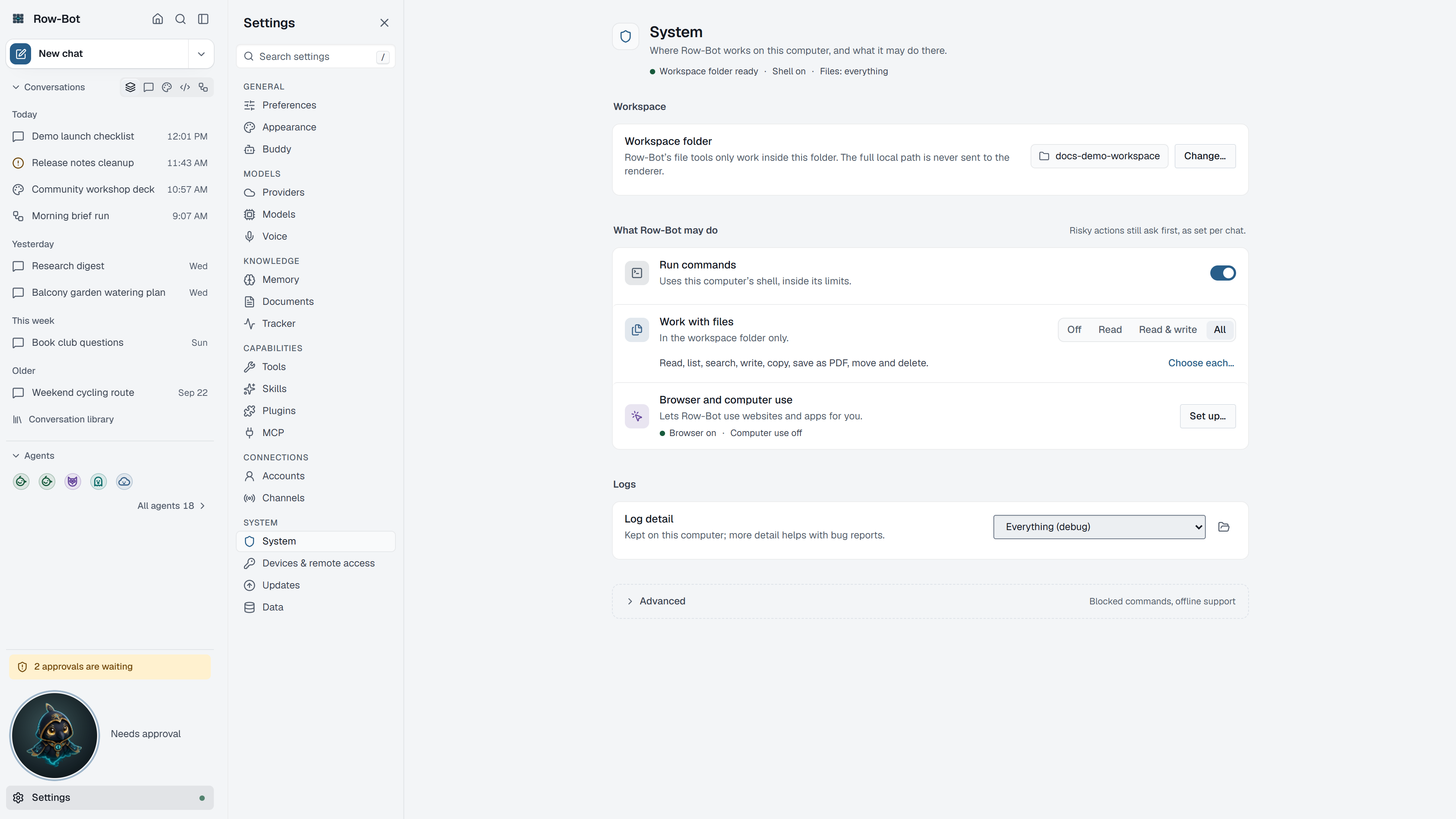
Where To Find It
Open Settings, then choose System in the System group, or search for it with Find a setting.
Workspace
Workspace folder is where Row-Bot keeps its own files on this computer, such as new draft code folders. Choosing a folder needs the Row-Bot desktop app.
What Row-Bot May Do
Risky actions still ask first, as each conversation's Approvals setting decides.
- Run commands turns the shell tool on or off. The command palette can flip it too ("turn off shell").
- Work with files controls the file tools.
- Browser and computer use opens their setup:
- Browser turns the browser tool on and chooses its runtime: a supported installed Chrome or Edge, or Row-Bot's exact managed Playwright Chromium. Install browser runtime and Repair are explicit actions; normal start-up only checks readiness and never downloads a browser.
- Desktop apps sets up Computer Use (Beta), which stays off by default and is gated by platform readiness, its telemetry disclosure, and a verified optional runtime. See Computer Use.
Logs
Log detail sets how much Row-Bot writes to its local log. Open log folder opens it. Monitor's Logs shows the same log inside the app.
Advanced System Settings
Additional blocked command patterns, app availability for Computer Use, and removing the managed Computer Use runtime live under Advanced system settings.
Let the agent read Row-Bot's data folder is there too, off by default. Row-Bot's data folder holds your conversations, settings and keys, so shell commands that name it are refused. When it is on, such commands ask you every time instead. File tools never read or change that folder.
What Moved
- Connecting a phone or another computer, signed-in devices, network access and the public link (tunnel) are on Settings › Devices & remote access. See Remote Access And Server Mode.
- Open in (app window or browser) is on Settings › Preferences.
- Updates are on Settings › Updates. See Updates.
Common Workflow
- Keep the workspace folder somewhere you back up.
- Turn on commands, files or the browser only when you intend to use those tools.
- Turn on Computer Use only on an interactive Windows or macOS desktop after reading its setup and safety guide.
- Raise Log detail while troubleshooting, then lower it again.
What Is Saved
System settings are global for the active Row-Bot data directory. Workspace files are not uploaded to Row-Bot; external providers may still receive content when a model or tool request sends it.
Privacy And Safety
Commands, file access, browser automation and Computer Use widen what Row-Bot can do on this computer. Keep approvals on Ask in conversations that use them, and review each request.
Control-Level Reference
The generated Settings Controls reference lists every searchable setting on this page with its deep link, search keywords, and any dependency or security notes.
Troubleshooting
- If Row-Bot cannot read a file, check whether it is inside the folder it was given and that Work with files is on.
- If Browser reports a missing or mismatched managed runtime, use Install browser runtime or Repair. Do not copy another Playwright cache into Row-Bot's managed location.
- If Computer Use is unavailable, open its setup and follow the reported runtime or operating-system permission step.
- If choosing the workspace folder does nothing, use the Row-Bot desktop app.