Settings: Documents
Documents let Row-Bot search files you add to its local document library. This is different from attaching a file to one chat: indexed documents become reusable context for future questions. Mixedbread Embed Large v1 is the recommended local embedding model; it is separate from the chat model and normal use loads it only from Row-Bot's private cache.
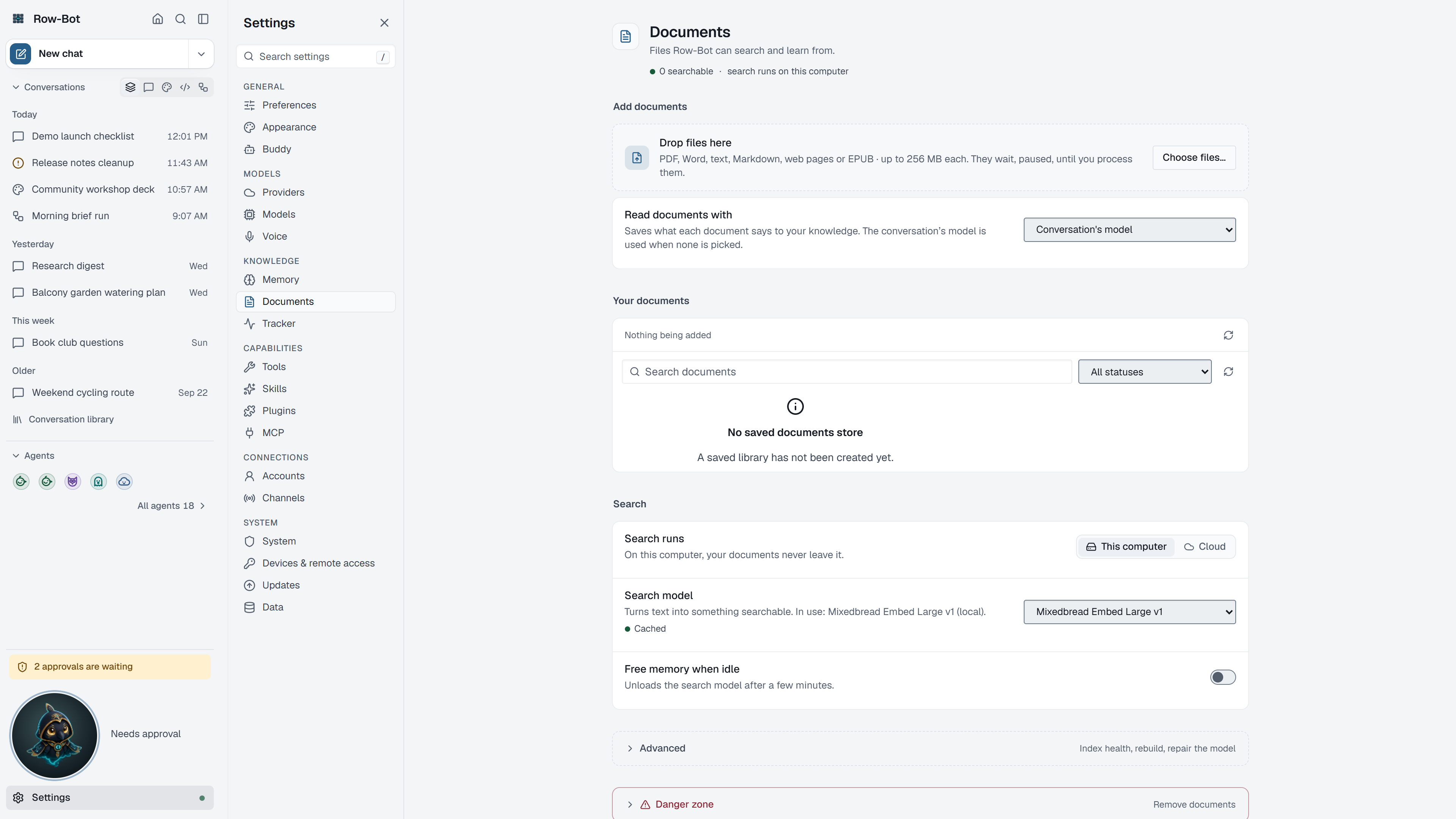
Where To Find It
Open Settings, then choose Documents in the Knowledge group, or search for it with Find a setting.
Controls
- Search runs chooses where search works: This computer (your documents never leave it) or Cloud (document text goes to the embedding provider). Switching to Cloud asks first.
- Search model chooses the embedding model. Mixedbread Embed Large v1 is the recommended local one.
- Free memory when idle releases the local search model's memory after heavy document work.
- Index health and maintenance shows the state of your document vectors and memory index:
- Index size is for advanced search models that need a fixed number of dimensions.
- Document index and Memory index each offer Rebuild, which recreates them with the current search settings.
- Search model files offers Download to install the selected local model, Retry to load an already cached copy again, and Repair to replace a damaged download. Download and Repair need network access.
- Upload documents adds files to Row-Bot-managed storage for indexing.
- Your documents lists what Row-Bot has processed, with each document's status and progress, and can remove a document after review.
Common Workflow
- Under Search model files, choose Download before adding a large document library.
- Upload a small test document and wait until it is indexed.
- Ask a question in a chat that should require the document.
- Rebuild vectors only when you change the search model or suspect stale results.
What Is Saved
Uploaded files, extracted text, vectors, and local embedding model caches are stored under the active Row-Bot data directory. In Docker, the named /data volume preserves the cache. The active chat only sees relevant results when document search is enabled. A cloud embedding provider is opt-in and sends indexed text to that provider; the recommended local model does not.
Privacy And Safety
Review credential, account, channel, provider, or tool settings before enabling features that can contact outside services. Local-only features stay on your machine until you ask Row-Bot to use a provider, account, channel, MCP server, plugin, or tool that sends data elsewhere.
Control-Level Reference
The generated Settings Controls reference lists every searchable setting on this page with its deep link, search keywords, and any dependency or security notes.
Troubleshooting
- If search misses obvious content, rebuild vectors and check the embedding provider.
- If the local model is missing, use Download under Search model files. Use Retry for a cached model or Repair for a damaged download.
- If local indexing uses too much memory, turn on Free memory when idle.
- If a document contains private material, remove it from the document library before sharing screenshots or logs.