Remote Access And Server Mode
Row-Bot Remote Access lets one owner use the same instance from several trusted browsers. It is a single-owner, multi-device system, not a multi-user service or a hostile tenant-isolation boundary.
Reachability, authentication, and presentation are separate:
- A network route lets a browser reach Row-Bot's neutral connection page.
- A one-time invitation authorizes one browser to create a revocable session.
- Every authenticated interactive browser represents the same owner.
- Desktop or compact presentation changes layout only, never authority.
Normal desktop launches remain local-first. They listen on loopback, where the desktop app needs no sign-in, unless you explicitly enable another route. Authenticated server mode is stricter: every browser must connect with a valid session, including a browser on the server itself.
Configure Remote Access In The App
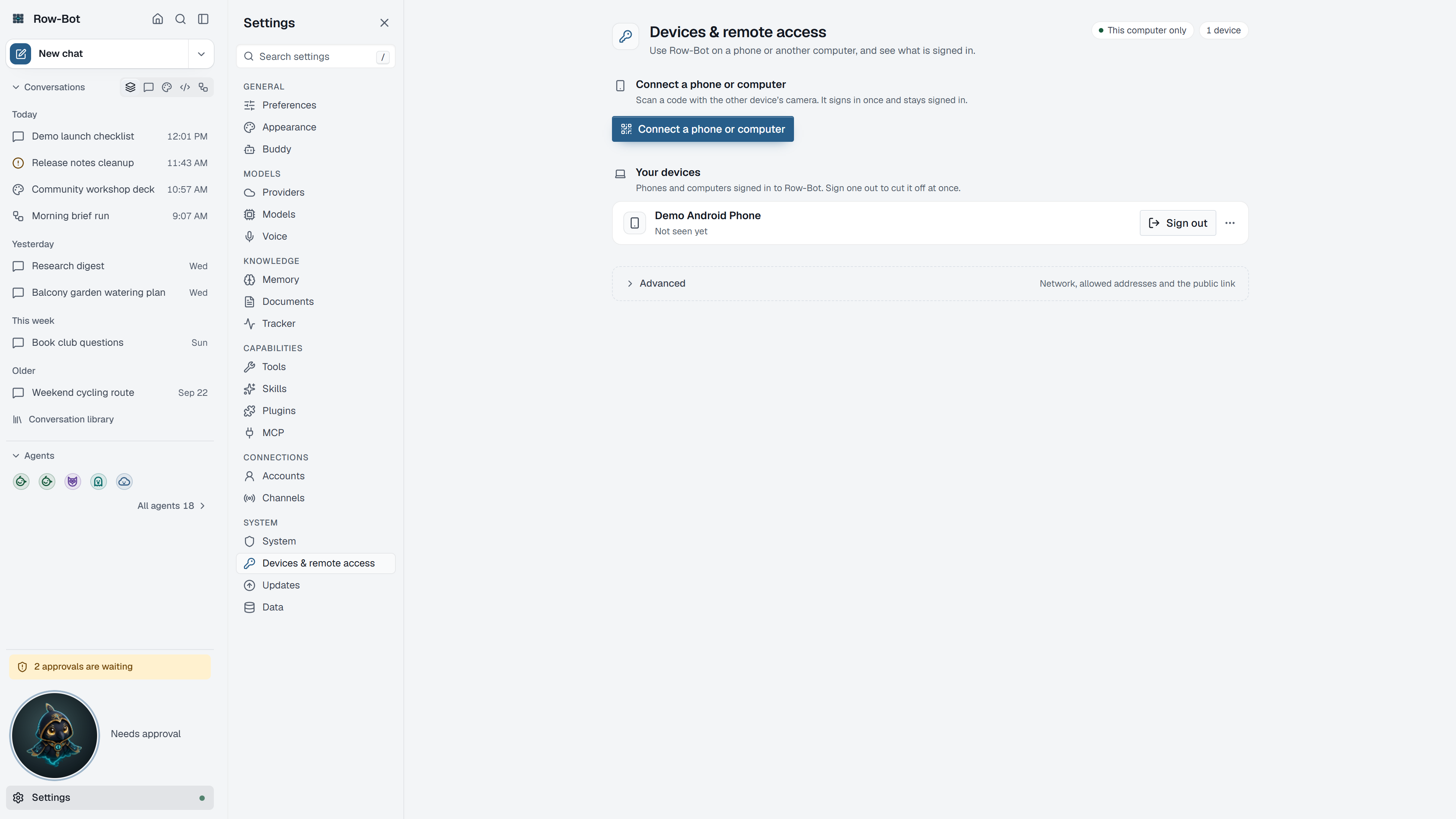
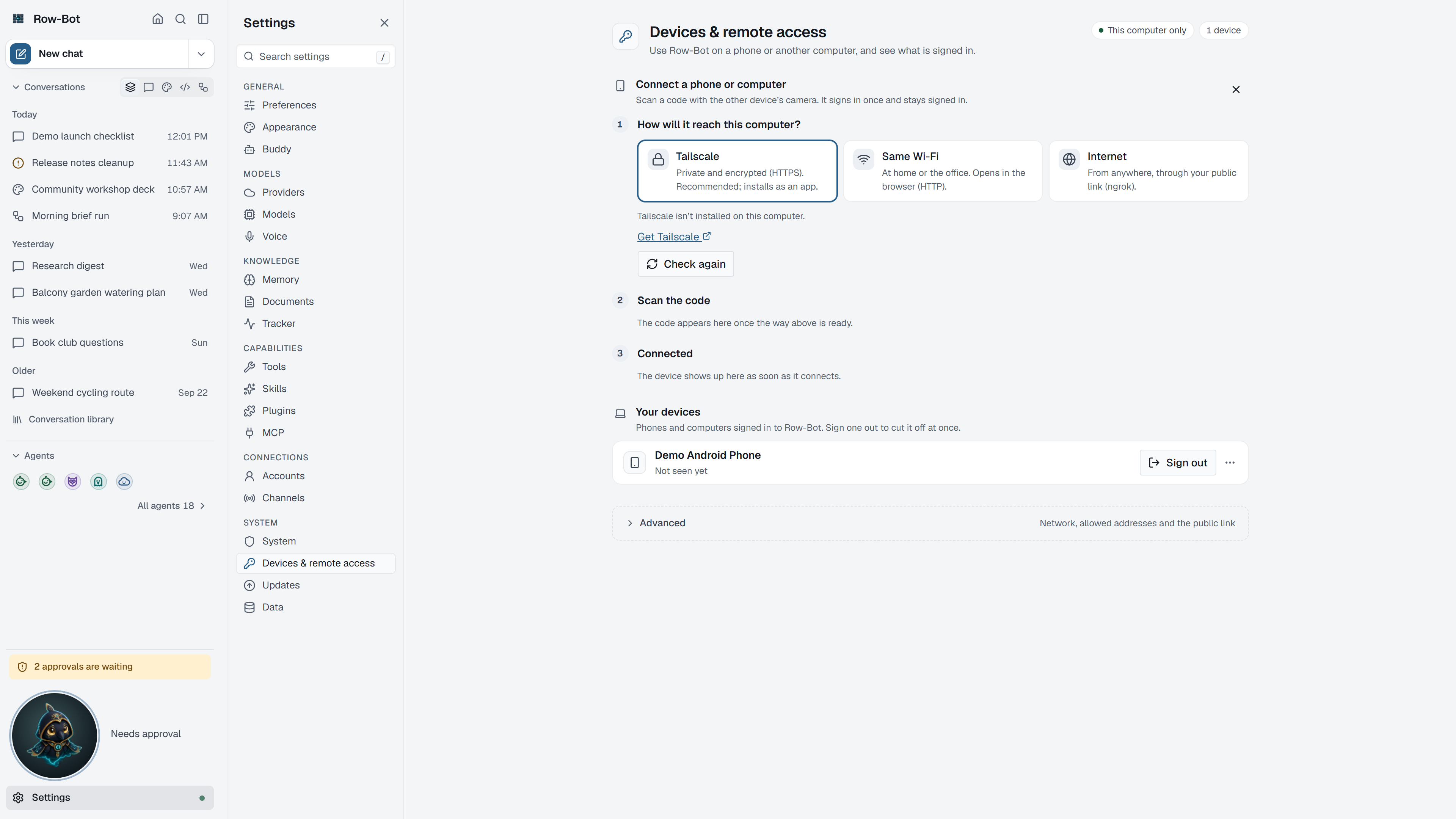
Open Settings › Devices & remote access from any signed-in owner session, including on a phone. The command palette finds it as "phone" or "connect device".
- Choose Connect a phone or computer.
- Choose How will it reach this computer?: Tailscale (private and encrypted HTTPS, recommended), Same Wi-Fi (a direct address on your network, over HTTP), Internet (from anywhere, through your public link), or Another address (a DNS alias, hostname or other browser-facing address you set up yourself, entered as its exact HTTP or HTTPS origin).
- Choose how long it should Stay signed in: 30 days or 12 hours.
- Scan the code on the other device, or open the shown address there. Codes work only once; Show a new code replaces an expired one.
- Review the confirmation page on that device, then press Connect. The page on the computer then says Connected, and Connect another starts again.
- Your devices lists every signed-in phone and computer and signs one out.
Row-Bot saves a new address, applies its exact Host/origin admission rule immediately, and creates the origin-bound code without a restart. Same Wi-Fi first asks to let devices on your network reach Row-Bot, which restarts it to listen on your network. Under Advanced, Network shows where Row-Bot listens (This computer only, or This computer and my network) and its Allowed addresses, and Public link sets up the ngrok tunnel, which opens only when you start it.
The choice of routes refreshes from current state when the code is created. Row-Bot refuses a stale or no-longer-reachable selection instead of issuing a misleading link.
Saved trusted addresses remain in access_routes.json across restarts and appear among the ways to reach this computer. Remove one from Allowed addresses when it is no longer needed; new HTTP and WebSocket requests through that exact address are rejected immediately. Removing the address can interrupt current access through it.
Enter one exact http:// or https:// origin with an optional port, such as http://row-bot.lan:8080 or https://row-bot.example.com. Credentials, paths, queries, fragments, wildcards, malformed ports, and non-HTTP(S) schemes are rejected. A non-default port trusts only that exact authority, not another port.
Trusting an address changes only Row-Bot admission and invitation routing. Row-Bot performs no DNS lookup or reachability probe and does not create DNS records, provision TLS, configure a proxy, open a firewall, or change the listen address. HTTP traffic is unencrypted. HTTPS still requires external DNS and TLS setup; a TLS-terminating reverse proxy must also use the existing exact trusted-proxy configuration.
Origins supplied through ROW_BOT_PUBLIC_ORIGINS are listed as Managed externally and cannot be edited in the UI. When ROW_BOT_ALLOWED_HOSTS is set, deployment configuration owns Host admission, so trusted-address add/remove controls are read-only and do not override it.
Invitations, Sessions, And Layouts
| Item | Meaning |
|---|---|
| Invitation | A secret link that expires after 10 minutes and can be consumed once. Opening or previewing it does not connect the device; the recipient must press Connect. |
| Session | A separate HttpOnly browser credential created after acceptance. Raw session secrets are never placed in the URL. |
| Trusted device | A session lasting up to 30 days. An active owner UI checks at startup and every 12 hours, renewing the session to 30 days when it enters the final seven days. |
| Temporary access | A session lasting up to 12 hours. |
| Desktop layout | The full owner product in its wide-screen presentation. |
| Compact layout | The same owner authority in a phone-safe presentation, including every Settings page. Design and Developer panels open as full-screen sheets. |
Row-Bot stores only hashed invitation and session secrets in the versioned access database. Sessions survive normal restarts and can be revoked individually. Revoking a device revokes its sessions.
An inactive trusted browser can still expire after 30 days; recover by creating a new one-time invitation from a trusted local terminal, SSH session, or container exec. Temporary 12-hour sessions and migrated legacy sessions retain their fixed expiry and do not renew.
Row-Bot has no guest or multi-user sharing boundary. Device names, user agents, routes, and layout choices are session metadata, not entitlements. Existing action approval gates continue to govern sensitive tools and operations.
Treat an unused invitation like a password. Do not paste it into chat, logs, issue reports, screenshots, shell history you plan to share, or a public URL.
Choose A Connection Route
| Route | Best fit | Important boundary |
|---|---|---|
| Local desktop | Browser and Row-Bot are on the same computer. | Default desktop mode stays on loopback and does not expose a remote listener. |
| Tailscale Serve | Recommended private HTTPS access across your tailnet. | Tailnet membership does not replace a Row-Bot invitation or session. |
| Direct LAN | A private, trusted local network. | Remote LAN HTTP is unencrypted and does not provide a secure browser context for microphone capture. |
| Trusted hostname or address | An existing exact DNS alias, hostname, or browser-facing IP and port. | Row-Bot trusts only the saved origin; it does not provide DNS, TLS, proxy, firewall, or reachability setup. |
| SSH tunnel | An operator can SSH to a remote host and wants no published Row-Bot port. | Keep Row-Bot on loopback and create the invitation for the workstation-facing forwarded origin. |
| Docker | A headless, isolated, reproducible instance. | The supplied Compose file publishes to host loopback by default and persists /data. |
| HTTPS reverse proxy | An operator owns DNS, TLS, proxy configuration, backups, and ingress policy. | Trust only the exact proxy address or CIDR that connects to Row-Bot. |
An active route means the connection page is reachable. It does not mean the browser is trusted.
Tailscale Serve
Tailscale Serve is the recommended desktop route because it provides a private HTTPS origin without changing Row-Bot's default bind address.
Row-Bot does not install Tailscale, sign you in, enable Funnel, reset the complete Serve configuration, change firewall rules, or overwrite an unrelated route. Status checks and planning are read-only. Enabling a route requires you to review the exact private Serve change, accept the third-party disclosure, and confirm it in the UI.
Row-Bot refuses to mutate when Funnel is active, a conflicting route exists, ownership cannot be verified, or the Tailscale CLI outcome is ambiguous. It records ownership only after it verifies the exact route it created, and it removes only that unchanged owned route.
After a verified enable or disable, Row-Bot asks its launcher to restart the app. That restart activates the matching proxy policy:
- only loopback connections from the local Tailscale proxy are trusted;
- only the verified owned
.ts.nethost and HTTPS origin are added; - the owned route must still target this exact Row-Bot app port.
If the launcher is unavailable, the UI tells you to restart Row-Bot manually. A manually managed Tailscale or reverse-proxy route is not treated as Row-Bot-owned; configure its public URL, allowed host, and exact proxy trust explicitly.
After Tailscale reports Active Owned, create the invitation for its verified private origin. The recipient still needs the one-time invitation and resulting Row-Bot session.
Direct LAN
Use Allow local-network connections only on a network you trust. The launcher restarts Row-Bot after the durable listen setting changes.
Anyone who can reach the port can see the neutral connection page, but cannot use the application without a valid session. Over LAN HTTP a signed-in browser can send messages and make changes as it can on this computer; only the microphone needs localhost or HTTPS. LAN HTTP is unencrypted. Prefer Tailscale or an operator-managed HTTPS origin on shared, guest, workplace, or otherwise untrusted networks. Row-Bot does not change the host firewall.
SSH Tunnel
Start Row-Bot on loopback:
row-bot serve --host 127.0.0.1 --port 8080
Forward a workstation port:
ssh -N -L 18080:127.0.0.1:8080 user@row-bot-host
Create the invitation for the origin the browser will actually use:
row-bot access invite \
  --layout desktop \
  --origin http://127.0.0.1:18080
Advanced / Managed Deployments
Environment variables and CLI flags remain useful when deployment tooling must own policy. ROW_BOT_PUBLIC_ORIGINS entries are visible but read-only in Settings. Setting ROW_BOT_ALLOWED_HOSTS makes Host admission externally managed and disables trusted-address mutation in the UI; durable UI addresses never override that explicit policy.
Authenticated Server Mode
row-bot serve starts one authenticated headless instance. It defaults to loopback, one worker, no tray, no splash, no opened browser, and no automatic Ollama startup.
For a host-installed HTTPS reverse proxy:
row-bot serve \
  --host 127.0.0.1 \
  --port 8080 \
  --public-url https://row-bot.example.com \
  --allowed-host row-bot.example.com \
  --trusted-proxy 127.0.0.1/32
The equivalent core environment settings are:
ROW_BOT_DEPLOYMENT_MODE=server
ROW_BOT_PUBLIC_URL=https://row-bot.example.com
ROW_BOT_ALLOWED_HOSTS=row-bot.example.com
ROW_BOT_TRUSTED_PROXY_CIDRS=127.0.0.1/32
ROW_BOT_WORKERS=1
# Optional: turn install stats off on this server (see Privacy And Safety).
ROW_BOT_INSTALL_COUNT=0
Use the address that actually connects from the proxy to Row-Bot. Do not trust every private address, a whole Docker bridge range, or caller-supplied forwarding headers. Do not buffer the event stream (/api/v1/events, text/event-stream) and terminate remote traffic with HTTPS. The reviewed Caddy example and systemd service are starting points, not substitutes for operator-owned firewall, rate-limit, logging, backup, and recovery policy.
The deprecated row-bot --server --no-open form remains compatible, but new scripts and services should use row-bot serve.
Cloudflare Tunnel
A Cloudflare Tunnel is an HTTPS reverse proxy: Cloudflare serves your hostname and cloudflared passes each request on to Row-Bot. Row-Bot does not install cloudflared or set up the tunnel, DNS, or Cloudflare Access.
- Point the tunnel at Row-Bot's loopback address, such as
http://127.0.0.1:8080, rather thanlocalhost, so requests come from one known address. Do not set the tunnel's HTTP Host Header to another name; Row-Bot checks the public hostname. - Trust only the address
cloudflaredconnects from. When it runs on the same computer, setROW_BOT_TRUSTED_PROXY_CIDRS=127.0.0.1/32before Row-Bot starts, or pass--trusted-proxy 127.0.0.1/32torow-bot serve. - Add the public origin, such as
https://row-bot.example.com, as Another address in the app (or with--public-urland--allowed-host), and create the invitation for it.
Cloudflare sends CF-Connecting-IP beside X-Forwarded-For and X-Forwarded-Proto. Row-Bot accepts it and takes the client address from X-Forwarded-For. Leave Cloudflare's Remove visitor IP headers managed transform off, because Row-Bot needs X-Forwarded-For, and leave Add "True-Client-IP" header off, because Row-Bot refuses that header.
Docker
The supplied Docker image contains the complete supported server feature set: all canonical Python extras, matching headless Playwright Chromium, native media libraries, uv/uvx, and pinned Node.js with node/npm/npx. It does not contain invitations, sessions, credentials, downloaded voice models, arbitrary MCP servers, or Tailscale.
Compose publishes 127.0.0.1:8080 by default and persists private state and explicit model/runtime downloads under /data. Every browser must claim an invitation, including a browser on the Docker host. Docker bridge and gateway addresses never grant owner identity.
Follow Docker And VPS Operations for the pull-first public runbook, and use the repository's Docker operator notes when building from source. The public guide covers:
- invitation bootstrap with
docker compose exec; - intentional LAN or HTTPS publication;
- multiple isolated instances;
- health and readiness checks;
- read-only secret files;
- backups, upgrades, restore, and rollback;
- trusted-session renewal and inactive-session recovery;
- browser, MCP runtime, local-model cache, and headless feature boundaries.
Never mount the host Docker socket merely to satisfy a tool or MCP server.
Voice From A Remote Browser
Local browser voice uses the requesting browser's microphone and speaker. The browser sends bounded audio to Row-Bot for transcription with the selected local STT engine: Whisper by default, or SenseVoice after its explicit installation. Row-Bot returns local Kokoro audio to that same browser. A headless server or container does not need access to the host microphone or speakers.
Browsers permit microphone capture on localhost or in a secure HTTPS context. Plain HTTP on a remote LAN address is insufficient. Use Tailscale HTTPS or a correctly configured HTTPS reverse proxy for remote dictation or talk.
Whisper, SenseVoice, and Kokoro model installation remains an explicit owner action and can use several gigabytes of persistent cache. SenseVoice alone is an approximately 940 MB ModelScope download and is unavailable on Intel macOS. OpenAI Realtime voice is a separate provider/network feature; local browser voice does not silently fall back to it.
Offline Access Management And Recovery
Use a trusted local terminal, SSH session, or docker compose exec:
row-bot access invite --layout desktop --origin https://row-bot.example.com
row-bot access invite --layout compact --temporary --origin https://row-bot.example.com
row-bot access list
row-bot access revoke DEVICE_ID
row-bot access revoke SESSION_ID --session
row-bot access revoke-all --yes
row-bot access doctor
list and doctor never print reusable session secrets. Invitation commands are the only commands that print a raw one-time link.
If every owner session is lost, create a new owner invitation from a trusted terminal. Back up the complete active ROW_BOT_DATA_DIR while Row-Bot is stopped. It contains conversations, configuration, instance identity, invitations, devices, sessions, and other private state; operating-system keyring credentials may require a separate recovery plan.
Troubleshooting
untrusted_forwarding_headers: a proxy supplied forwarding headers from an address Row-Bot does not trust. For a Row-Bot-owned Tailscale route, restart once if the UI reports that restart is required. For an operator proxy, set only its exact connecting address inROW_BOT_TRUSTED_PROXY_CIDRS. Do not fix this by trusting a broad network.unsupported_forwarding_headers: a trusted proxy sent a client-address header Row-Bot does not use, such asX-Real-IP,True-Client-IP, orX-Forwarded-Server. Have the proxy sendForwarded, orX-Forwarded-ForwithX-Forwarded-Proto(andX-Forwarded-Hostif it changes the host), and remove the others. Cloudflare'sCF-Connecting-IPis accepted besideX-Forwarded-For; see Cloudflare Tunnel. Do not fix this by trusting a broad network.missing_x_forwarded_for: a trusted proxy sentX-Forwarded-ProtoorX-Forwarded-HostwithoutX-Forwarded-For, for example with Cloudflare's Remove visitor IP headers on. Have the proxy sendX-Forwarded-For.unexpected_host: on a desktop launch, open Settings › Devices & remote access, add the exact browser-facing origin (as Another address when connecting a device, or under Advanced › Network › Allowed addresses), and retry without restarting. In a managed deployment, the host may instead be missing fromROW_BOT_ALLOWED_HOSTS, or the proxy may have forwarded a different host.- Origin or invitation mismatch: create the invitation for the exact browser-facing scheme, host, and port. Do not reuse an invitation after changing routes.
- Tailscale conflict or unowned route: inspect the existing Serve configuration. Row-Bot will not reset or overwrite it.
- Phone reaches the page but cannot use Row-Bot: reachability is working; create or reclaim the correct invitation and confirm the device was not revoked.
- Remote microphone unavailable: use HTTPS, grant microphone permission in that browser, and install the local voice model explicitly.
- Server starts but is not ready: check
/healthz,/readyz, local logs, androw-bot access doctor.
For command lookup, see the generated CLI reference and environment reference.