Row-Bot Documentation
Row-Bot is a local-first AI workbench for people who want provider-aware models, parent-led agents, durable documents, memory, tools, workflows, design, code help, integrations, and voice in one controllable system. Run it as a desktop application or a private authenticated server; this guide explains installation, Docker deployment, owner access, the main interface, settings, and every explicit external route.
These pages describe Row-Bot 5.2.1, the release represented by this source tree.
Start Here
- Getting Started explains the install path, first launch, and setup choices.
- Row-Bot Interface tours the sidebar, Home, a conversation and its details card, panels, the terminal, the ⌘K command palette, Buddy and Settings.
- Home: Overview explains the first page: the Ask box, what needs you, live status and recent work.
- Chat explains conversations, composer controls, attachments, model selection, approvals in place, tool results, and the conversation library.
- Reasoning Controls explains model-specific effort, thinking toggles, token budgets, and provider-default fallback behavior.
- Settings explains every settings page and what each choice changes.
- Profiles, Goals, And Agents explains the Agents dialog, goals that keep going until done, delegated agents, and recovery.
- Remote Access And Server Mode explains invitations, sessions, Tailscale, LAN, HTTPS proxies, and browser-local voice.
- Docker And VPS Operations explains the official container, persistent data and secrets, backup, upgrade, and rollback.
- Computer Use explains the opt-in native desktop tool, setup, live controls, and safety boundaries.
Feature Guides
- Apps for connecting services such as GitHub, Notion or Linear, choosing what each may do, and using them in chats.
- Skills for adding ways of doing a job from featured catalogs and using them with their /name.
- Workflows for repeatable background work and scheduled agents.
- Reasoning Controls for choosing the supported reasoning depth of the active model without changing models.
- Designs for decks, documents, landing pages, mockups and storyboards in a conversation's Design panel.
- Code Folders for binding or cloning a folder from a conversation and working on it in the Developer panel.
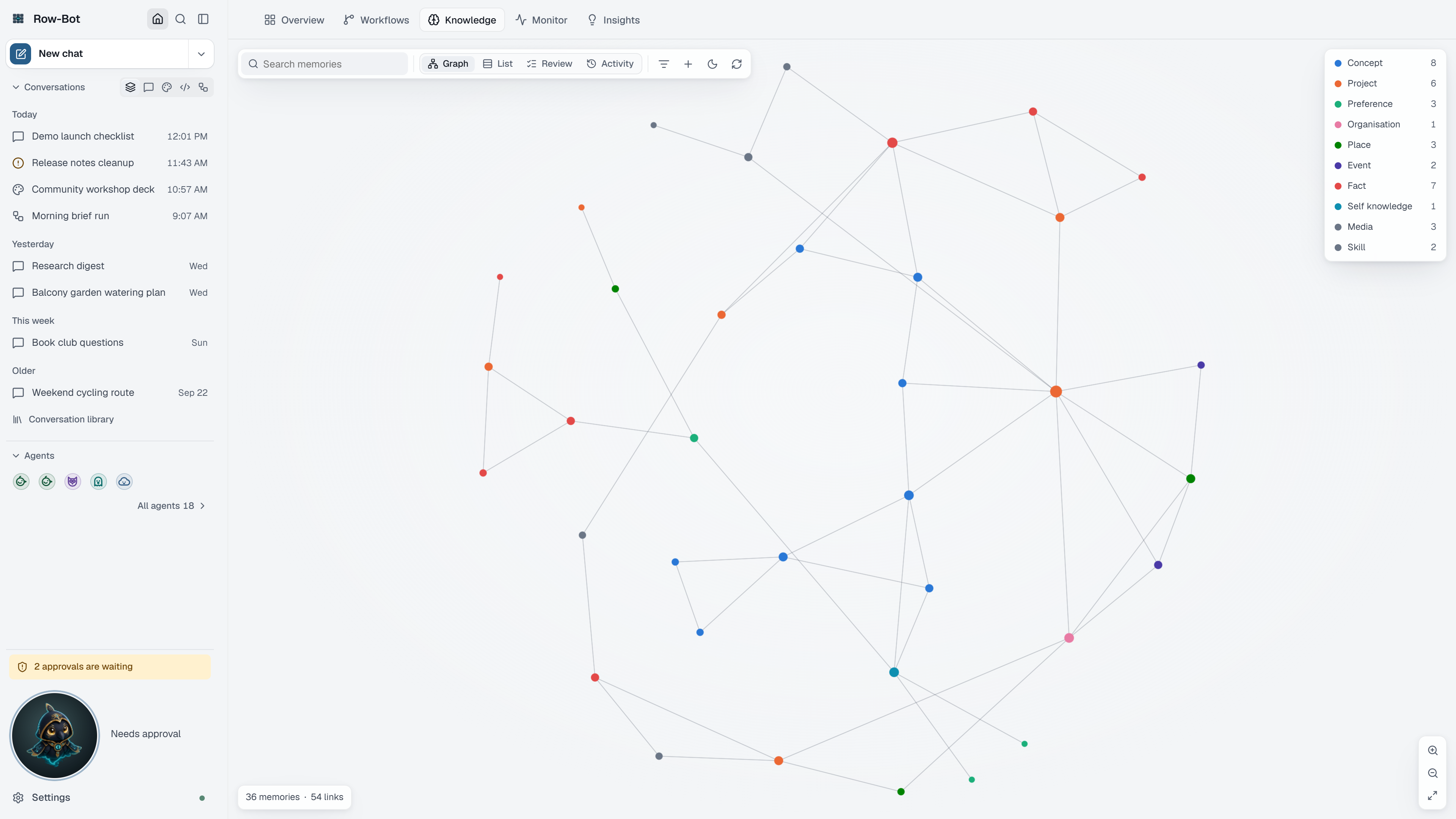
- Knowledge for local memory, durable document ingestion, graph review, and background organization.
- Computer Use for target-window automation in native Windows and macOS applications.
- Phone And Native Desktop for the same owner product on a phone and in the native desktop app.
- Remote Access And Server Mode for owner invitations, Tailscale, LAN, SSH, Docker, HTTPS proxies, and remote browser voice.
- Docker And VPS Operations for the official image, hardened Compose, credentials, backup, upgrade, rollback, and recovery.
- Monitor for kept health checks, one-click fixes, activity, history, and logs.
- Insights for what Row-Bot noticed and the proposals it prepared for your review.
- Skills for finding, adding, trying, and creating skills.
- Settings: Apps for connecting the services Row-Bot can work in and choosing what each may do.
- Progressive Tools And Skills for automatic external-tool discovery, per-task skill selection, compatibility mode, and safety boundaries.
- Channels, Hosted And Local Apps, and Packages for messaging channels, app connections, and packages.
- Extend Row-Bot to choose safely between Skills, Custom Tools, plugins, MCP, channels, and accounts.
- Operations, Data, And Recovery for backups, restore, updates, repair, uninstall, and diagnostic sharing.
- Voice and Buddy for speech input, Talk, Dictate, read-aloud, and Buddy's native drag-to-undock desktop overlay.
How To Read These Docs
Each major page explains what the feature is, where to find it, the important controls, a common workflow, what is saved, privacy and safety implications, and troubleshooting. Screenshot captions describe the product UI so you can connect the text to what you see in the app.
References
Use Reference when you need tables of tools, providers, settings pages, channels, skills, MCP servers, plugins, storage, or approval behavior. The guided pages should be your first stop; the reference pages are for lookup.