Home: Overview
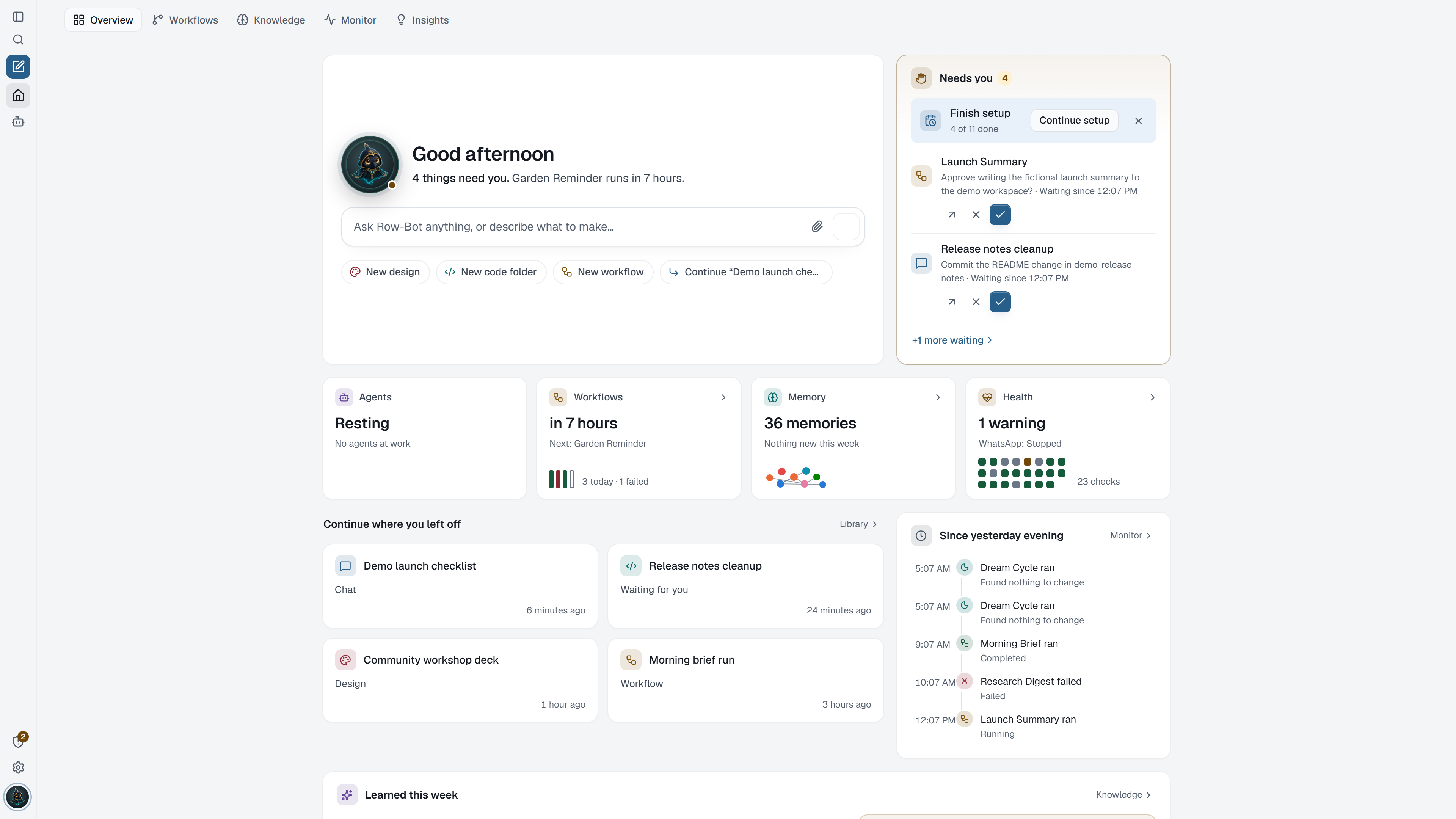
Overview is the first page Row-Bot opens. It answers three questions at a glance: what needs you, what is running, and where you left off. Everything on it opens the place where the work actually lives, so you can act without hunting through tabs.
Where To Find It
Choose Home in the sidebar. Overview is the first of the five Home tabs: Overview, Workflows, Knowledge, Monitor and Insights. Until a default model exists, opening Row-Bot opens first launch instead.
Ask Box And Quick Starts
- Ask Row-Bot anything, or describe what to make… starts a new chat with your text. Use Add files in a new chat to attach files first, then Start chat.
- New design and New code folder set up a design or a code folder and open it in a new chat with its panel beside it. See Designs and Code Folders.
- New workflow opens the workflow editor on the Workflows tab.
- Continue "…" reopens your most recent conversation.
Needs You
Needs you comes first and counts what is waiting for you:
- Approvals from any conversation, workflow or delegated agent show Approve and Deny right in the card, with how long each has waited. Open the conversation or workflow when you want the full context first.
- Interrupted agent work offers Resume or Dismiss.
- Failed workflows offer Run … again.
- Apps that need you: an app that is on but needs a sign-in, its key or attention shows as Sign in to app, App needs its key or App needs attention, with its logo and the fix as a button, such as Sign in again or Add key. The button opens the app in Settings › Apps at that fix; for an account or channel, its own settings.
- Health checks that need attention carry their one-click fix, such as restarting a stopped channel, reconnecting an account, choosing a model, or checking again. See Monitor.
- Finish setup appears while Setup Center still has steps; hide the reminder once you are done.
When nothing waits, the card says you're all caught up.
Live Status
The status strip shows four tiles, each opening its tab:
| Tile | What it shows |
|---|---|
| Agents | Agents working in your conversations right now. |
| Workflows | What is scheduled next and today's runs. |
| Memory | A small picture of your most connected memories and what is new this week. |
| Health | The latest Monitor checks, which run by themselves. |
Recent Work
- Continue where you left off shows recent conversations as cards, with pinned ones first and a mark on any that is replying, waiting for you, or was interrupted.
- Since yesterday evening is a timeline of what ran: workflow runs, finished agents, Dream Cycle runs and new memories.
- Learned this week lists subjects Row-Bot saved to memory, and a current insight with Open Insights. See Home: Insights.
What Is Saved
Overview stores nothing of its own. It reads your conversations, workflows, approvals, memories and Monitor checks, and every action runs through the same reviewed command as the place it comes from.
Troubleshooting
- If Overview opens Setup instead, finish choosing a model or choose Set up later.
- If a tile reads Unavailable, refresh the page; Monitor shows whether the service behind it is healthy.
- Approving from Overview is the same decision as approving in the conversation. Open the conversation first when the request is not obvious from its title.